تواجه معظم الشركات التي تشتري أجهزة راديو ثنائية الاتجاه اليوم السؤال نفسه: البقاء مع التناظري المجرَّب أم الانتقال إلى الرقمي DMR. كلاهما يعمل جيداً. ويختلفان في عدد المحادثات التي تحملها القناة، وفي سلوك الصوت عند حافة التغطية، وفي الميزات المتاحة، وفي سعر كل جهاز.
يقارن هذا الدليل بينهما في النقاط المهمة في الاستخدام اليومي، ويقدّم طريقة بسيطة للقرار لمستودع أو موقع إنشاء أو فندق أو ميناء أو مصنع.
الخلاصة: اختر التناظري لفريق صغير في موقع واحد، أو لأسطول تناظري قائم يعمل جيداً، أو لميزانية ضيقة. واختر DMR عندما تكون القنوات مزدحمة، أو تريد GPS أو الرسائل النصية أو المكالمات الفردية، أو تريد صوتاً نظيفاً حتى حافة التغطية. وتنتقل أعمال كثيرة تدريجياً باستخدام أجهزة تعمل بالنمطين.
كيف يعمل كل منهما
يرسل راديو FM التناظري صوتك كإشارة متغيرة باستمرار، وتحمل القناة محادثة واحدة في الوقت نفسه. ويسمعها كل من يضبط التردد ونغمات الضبط نفسها، مهما كانت ماركة جهازه.
أما DMR (الراديو الرقمي المتنقل) فهو معيار مفتوح من ETSI. يحوّل الصوت إلى بيانات رقمية ويستخدم TDMA لتقسيم قناة عرضها 12.5 كيلوهرتز إلى فتحتين زمنيتين. وتستطيع كل فتحة حمل محادثتها الخاصة، فتدعم القناة الواحدة مكالمتين مستقلتين، أو مكالمة واحدة مع بيانات.
الشكل 1 — سعة القناة. يتيح TDMA لمحادثتي DMR مشاركة قناة واحدة عرضها 12.5 كيلوهرتز.
التناظري مقابل DMR في لمحة
العامل
التناظري FM
الرقمي DMR
المحادثات لكل قناة 12.5 كيلوهرتز
1
2 (فتحتان زمنيتان)
الصوت قرب حافة التغطية
يزداد ضجيجاً تدريجياً مع فحيح وتشويش
نظيف حتى قرب الحد، ثم يتقطع أو ينقطع
ضجيج الخلفية
يمرّ مع الصوت
يمكن لمعالجة الصوت الرقمية كتمه
عمر البطارية
عادي
أطول عادةً، لأن الجهاز يرسل في فتحة واحدة فقط من الفتحتين
الميزات
الضغط للتحدث والنداء الانتقائي الأساسي
مكالمات فردية وجماعية، رسائل نصية، تحديد موقع GPS، تنبيهات الطوارئ، بيانات (تختلف حسب الطراز)
الخصوصية
يستطيع أي شخص على القناة الاستماع
خصوصية صوتية أساسية، وخيارات تشفير أقوى في طرازات كثيرة
التوافق
أي جهاز FM تناظري على التردد ونغمات الضبط نفسها
أجهزة DMR، مع أن الميزات الخاصة بكل شركة قد لا تعمل بين الماركات
التكلفة لكل جهاز
أقل
أعلى
الانتقال
سهل الإبقاء عليه
تدعم أجهزة رقمية كثيرة القنوات التناظرية أيضاً (النمط المختلط)
الشكل 2 — توضيحي فقط. يتدهور التناظري تدريجياً، بينما يبقى الرقمي نظيفاً حتى ينقطع فجأة. تبيّن المنحنيات شكل السلوك وليست بيانات مقاسة.
متى يبقى التناظري الخيار الصحيح
فريق صغير في موقع واحد مع سعة قنوات متاحة كثيرة.
أسطول تناظري قائم يعمل جيداً ولا يحتاج إلى ميزات جديدة.
ميزانية ضيقة. تكلفة أجهزة التناظري لكل وحدة أقل، مثل الجهاز المتنقل التناظري Motorola DM1400 UHF 25W.
التواصل مع مستخدمي التناظري الآخرين، مثل المقاولين الزائرين أو المستأجرين الآخرين الذين يرجَّح أن يحملوا أجهزة تناظرية.
متى تنتقل إلى DMR
قنوات مزدحمة. فتحتان زمنيتان لكل قناة تضاعفان السعة دون تردد جديد.
احتياجات العمل الفردي والسلامة. تحديد الموقع GPS وتنبيهات الطوارئ ميزتان قياسيتان في DMR على طرازات كثيرة.
التوجيه والإشراف. المكالمات الفردية والجماعية والرسائل النصية تقلل ثرثرة القناة.
المواقع الصاخبة. يمكن لمعالجة الصوت الرقمية أن تعطي صوتاً أنظف حيث يكثر ضجيج الخلفية.
العمليات الأكبر أو متعددة المواقع التي ستنمو مع الوقت.
الانتقال دون استبدال كل شيء
لا تحتاج إلى التحوّل بين ليلة وضحاها. اشترِ أجهزة تدعم التناظري وDMR معاً، وانقل قناة واحدة أو قسماً واحداً في كل مرة، وأبقِ الأجهزة التناظرية في الخدمة حتى يحين استبدالها. ومنظومة الهوائي والكابل تعتمد على التردد وليس على كون الإرسال تناظرياً أم رقمياً، لذلك تخدم المنظومة المركّبة بشكل صحيح النمطين. راجع دليلينا عن الكابل المحوري لمحطات الراديو وتركيب الهوائي وفحص VSWR.
هل يمكن للأجهزة التناظرية والرقمية التخاطب مع بعضها؟
ليس مباشرةً. لا يستطيع الجهاز التناظري فقط فك إشارة DMR، ولا يستطيع جهاز DMR فقط استقبال التناظري. وتدعم أجهزة DMR كثيرة القنوات التناظرية أيضاً، فتستطيع التخاطب مع الأجهزة التناظرية عند التحويل إلى قناة تناظرية.
هل DMR هو نفسه MOTOTRBO؟
DMR هو المعيار المفتوح من ETSI. أما MOTOTRBO فهو خط منتجات Motorola Solutions الرقمي المبني على DMR، ويضيف ميزاته الخاصة. تعمل المكالمات الصوتية الأساسية بين الماركات التي تتبع المعيار، لكن الإضافات الخاصة بكل شركة قد لا تعمل.
هل يعطي الرقمي مدى أفضل من التناظري؟
ليس بطبيعته. تعتمد التغطية أساساً على قدرة الإرسال والهوائي والكابل والموقع. يُبقي الرقمي الصوت نظيفاً أقرب إلى حافة التغطية لكنه ينهار بعد ذلك بشكل أكثر فجائية. وتحسّن منظومة الهوائي والكابل منخفض الفقد المركّبة جيداً كلا النمطين.
هل ستعمل هوائياتي وكابلاتي الحالية مع أجهزة DMR؟
نعم، إذا كان نطاق التردد نفسه. تُختار الهوائيات والكابلات المحورية للتردد وليس لنوع التضمين، لذلك تخدم المنظومة المركّبة بشكل صحيح الأجهزة التناظرية والرقمية على السواء.
يعتمد أداء منظومة الراديو ثنائي الاتجاه على الكابل الذي يربط الجهاز بالهوائي. فإذا وصلتَ جهازاً بقدرة 25 واط بهوائيه عبر كابل محوري رفيع وعالي الفقد، يتحول جزء كبير من تلك القدرة إلى حرارة داخل الكابل قبل أن يصل إلى الهوائي. ثم يعمل الفقد نفسه ضدك عند الاستقبال.
يقارن هذا الدليل بين LMR-240 وLMR-400 وLMR-600 عند نطاقي VHF وUHF بالاعتماد على قيم التخميد المنشورة من Times Microwave، ويبيّن مقدار القدرة التي يوصلها كل كابل فعلياً في مسافة نموذجية، ويقدّم طريقة بسيطة لاختيار الكابل المناسب لمحطة قاعدة أو موقع مكرر. ولمعرفة أساسيات قياس الفقد راجع الدليل الشامل لسلسلة كابلات LMR.
لماذا يهم فقد خط التغذية أكثر من قدرة الجهاز؟
يُقاس فقد الكابل المحوري بالديسيبل، والديسيبلات تتراكم بسرعة: كل 3 ديسيبل من الفقد يزيل نصف القدرة. والفقد متماثل أيضاً؛ فما يأخذه الكابل من مرسلك في الاتجاه الخارج يأخذه من الإشارة الواردة في الاتجاه الداخل، لذلك يقلّص خط التغذية عالي الفقد تغطيتك في الاتجاهين.
ولهذا السبب نادراً ما تكون زيادة قدرة الجهاز هي الحل الصحيح. يمكن رفع محطة القاعدة من 25 إلى 50 واط، لكن الجهاز المحمول الذي يرد عليها لا يمكن رفع قدرته، وتظل إشارته مضطرة إلى عبور الكابل نفسه قبل أن تصل إلى مستقبل القاعدة. تقليل فقد خط التغذية يحسّن الاتجاهين معاً، أما زيادة قدرة الإرسال فتحسّن اتجاهاً واحداً فقط.
التخميد المنشور: LMR-240 وLMR-400 وLMR-600
الكابل
150 ميغاهرتز (VHF)
450 ميغاهرتز (UHF)
نصف قطر الانحناء المفرد
الأنسب لـ
LMR-240
9.9 ديسيبل/100 م
17.3 ديسيبل/100 م
19.0 مم
وصلات قصيرة ومسافات حتى نحو 10 م
LMR-400
5.0 ديسيبل/100 م
8.9 ديسيبل/100 م
25.4 مم
خط التغذية القياسي لمحطات القاعدة
LMR-600
3.2 ديسيبل/100 م
5.6 ديسيبل/100 م
38.1 مم
المسافات الطويلة ومواقع الأبراج والمكررات
القيم هي أرقام Times Microwave المنشورة عند 25 °م، محوّلة من ديسيبل لكل 100 قدم. راجع دائماً أحدث ورقة بيانات قبل تحديد المواصفات لوصلة حرجة.
UHF يكلّف أكثر من VHF على الكابل نفسه. يزداد فقد الكابل المحوري تقريباً مع الجذر التربيعي للتردد، لذا فالانتقال من 150 إلى 450 ميغاهرتز يضاعف الفقد نحو 1.7 مرة. وقد يكون خط التغذية الممتاز في منظومة VHF على الحد في منظومة UHF.
الشكل 1 — فقد الكابل على مسافة 25 م. عند UHF يفقد LMR-240 أكثر من نصف قدرة المرسل على هذا الطول.
كلفة كل طول من المسافة
طول المسافة
LMR-240
LMR-400
LMR-600
10 م
1.0 / 1.7 ديسيبل
0.5 / 0.9 ديسيبل
0.3 / 0.6 ديسيبل
25 م
2.5 / 4.3 ديسيبل
1.3 / 2.2 ديسيبل
0.8 / 1.4 ديسيبل
50 م
5.0 / 8.7 ديسيبل
2.5 / 4.5 ديسيبل
1.6 / 2.8 ديسيبل
تعرض كل خلية الفقد عند VHF (150 ميغاهرتز) / UHF (450 ميغاهرتز). هذه الأرقام للكابل وحده، فأضف جزءاً من الديسيبل لكل زوج موصلات ووصلة قصيرة وواقٍ من الصدمات في المسار.
كم من القدرة يصل فعلاً إلى الهوائي؟
لنفترض جهازاً بقدرة 25 واط على UHF، وهي فئة القدرة لجهاز متنقل مثل Motorola DM1400 UHF 25W، يغذّي هوائياً عبر 25 م من الكابل عند 450 ميغاهرتز:
الكابل
الفقد على 25 م
القدرة الواصلة
القدرة عند الهوائي
LMR-240
4.3 ديسيبل
37٪
نحو 9 واط
LMR-400
2.2 ديسيبل
60٪
نحو 15 واط
LMR-600
1.4 ديسيبل
72٪
نحو 18 واط
تغيير الكابل وحده من LMR-240 إلى LMR-400 يضع على الهوائي قدرة أكبر بنحو 60٪، ويحسّن حساسية الاستقبال بالمقدار نفسه (2.1 ديسيبل). ولا توجد ترقية جهاز بهذا السعر تحقق الأمرين معاً.
ما أطول مسافة ممكنة؟
من قواعد التصميم الشائعة إبقاء فقد خط التغذية عند 3 ديسيبل أو أقل، أي نصف القدرة، وتهدف مواقع كثيرة إلى قيمة أقل. يبيّن الشكل 2 أطول مسافة تبقى ضمن 3 ديسيبل لكل كابل.
الشكل 2 — أقصى مسافة قبل أن يبلغ فقد الكابل 3 ديسيبل. حدود UHF أقصر بنحو 40٪ من حدود VHF على الكابل نفسه.
اختيار الكابل
حتى نحو 10 م: LMR-240 مقبول، خاصةً عند VHF، وقطر انحنائه الأضيق يفيد داخل الخزائن الضيقة.
من 10 إلى 35 م: LMR-400 هو الاختيار القياسي ويناسب معظم محطات القاعدة على الأسطح ومواقع المكررات الصغيرة.
من 35 إلى 55 م عند UHF (أو من 60 إلى 95 م عند VHF): LMR-600.
ما بعد ذلك: لا تكتفِ بإضافة المزيد من الكابل. قرّب الجهاز أو المكرر من الهوائي، أو انتقل إلى خط تغذية منخفض الفقد بحجم أكبر.
وعندما يكون المسار ضيقاً فعلاً، فإن LMR-400-UF (الأكثر مرونة) يقايض قليلاً من الفقد الإضافي بنصف قطر انحناء أصغر.
الموصلات وملاحظات التركيب
طابِق الموصل مع الكابل. موصل N لـ LMR-400 وموصل N لـ LMR-600 قطعتان مختلفتان؛ فالجسم الخاطئ يعطي كبساً سيئاً وتلامساً متقطعاً.
استخدم N أو 7/16 DIN عند UHF. موصل UHF (PL-259) مقبول عند HF وVHF لكنه ليس ثابت المعاوقة، لذا تجنّبه عند UHF.
اعزل كل موصل خارجي ضد الماء بشريط ذاتي الالتحام وغلاف يقاوم الأشعة فوق البنفسجية. فتسرّب الماء هو السبب الأشيع لتدهور خط التغذية بمرور الوقت.
اشترِ كابلاً أصلياً. قد يفقد الكابل التقليدي أكثر بوضوح من رقم ورقة البيانات.
نعم، إذا كانت المسافة قصيرة. عند 450 ميغاهرتز يفقد نحو 1.7 ديسيبل على 10 م، وهو مقبول. أما عند 25 م فيفقد 4.3 ديسيبل ولا تصل أكثر من نصف قدرة المرسل إلى الهوائي. وعند VHF يمكنه بلوغ نحو 30 م قبل أن يصل إلى 3 ديسيبل. ولأي مسافة أطول من وصلة قصيرة عند UHF، انتقل إلى LMR-400.
هل يستحق LMR-600 كلفته الإضافية مقارنة بـ LMR-400؟
على مسافة 25 م عند UHF يبلغ الفرق 0.8 ديسيبل (2.2 مقابل 1.4 ديسيبل)، وهو يعادل نحو 3 واط على جهاز بقدرة 25 واط، إضافةً إلى المكسب نفسه عند الاستقبال. وهذا يستحق الدفع غالباً لمكرر حرج أو لوصلة على حافة التغطية. أما لمحطة قاعدة نموذجية على سطح بمسافة تقل عن 30 م، فإن LMR-400 هو الاختيار المعقول عادةً. وبعد نحو 35 م عند UHF يصبح LMR-600 ضرورة وليس خياراً.
لماذا يحتاج UHF إلى كابل أفضل من VHF؟
يزداد فقد الكابل المحوري مع التردد، تقريباً مع جذره التربيعي. والانتقال من 150 إلى 450 ميغاهرتز يضاعف الفقد على الكابل نفسه نحو 1.7 مرة، فيصبح خط التغذية الجيد في منظومة VHF على الحد في منظومة UHF.
هل أشتري جهازاً أعلى قدرة بدلاً من كابل أفضل؟
غالباً لا. مضاعفة قدرة الإرسال تعادل 3 ديسيبل، وهو ما يعادل إزالة 3 ديسيبل من فقد الكابل، لكنها تفيد المسار الخارج فقط. وعادةً ما يحدّ مرسل الجهاز المحمول الأضعف من المدى، ولا يحسّن جانب الاستقبال في محطة القاعدة إلا تقليل فقد خط التغذية. أصلح الكابل أولاً.
قراءة VSWR تبدو ممتازة. هل يعني ذلك أن الكابل سليم؟
ليس بالضرورة. فالفقد في الكابل يُضعف القدرة المنعكسة كما يُضعف القدرة الأمامية، لذلك قد يجعل الكابل الطويل أو عالي الفقد هوائياً سيئاً يبدو متوافقاً جيداً عند القياس من جهة الجهاز. وللحكم على الهوائي قِس عند طرف الهوائي، وللحكم على الكابل قارن فقده المقاس برقم ورقة البيانات.
تورّد برافو ساتكوم كابلات Times Microwave LMR-400 وLMR-600 مع موصلات N المناسبة، إضافةً إلى أجهزة راديو ثنائية الاتجاه من موتورولا وICOM وكينوود لتركيبات محطات القاعدة والمكررات.
جهاز الراديو الذي ينطفئ في منتصف الوردية جهاز لا يثق به أحد. معظم مشكلات البطاريات في أساطيل أجهزة الراديو ثنائية الاتجاه ليست أعطالاً حقيقية، بل تنتج عن بطاريات متهالكة كان يجب استبدالها، أو تلف بسبب الحرارة، أو شواحن غير متوافقة، أو بدائل رخيصة لا تقدّم السعة المكتوبة عليها.
يغطي هذا الدليل البطاريات والملحقات التي تُبقي الأسطول عاملاً: أنواع البطاريات، وكيف يُقاس زمن التشغيل، ومتى تستبدل البطارية، وكيف تختار الشواحن وميكروفونات الكتف.
الخلاصة: بطاريات الليثيوم أيون هي الخيار المعتاد للأجهزة الحديثة. استبدل البطارية عندما ينخفض زمن التشغيل بوضوح، لا عندما تتعطل. أبقِ البطاريات بعيداً عن الحرارة، واشحنها بالشاحن المخصص لها، واشترِ بطاريات أصلية أو من مورّد موثوق.
ليثيوم أيون مقابل NiMH مقابل NiCd
النوع
نقاط القوة
نقاط الضعف
ليثيوم أيون
الأخف وزناً بالنسبة لسعتها، بلا «تأثير الذاكرة»، وفقدان شحن منخفض أثناء الخمول
حساسة للحرارة والتلف المادي، ولذلك تعتمد على دائرة حماية
NiMH
سعة جيدة وتتحمل الاستخدام الشاق نسبياً
أثقل من الليثيوم أيون وتفقد شحنها أسرع أثناء عدم الاستخدام
NiCd
متينة وتصميم قديم مجرَّب
تأثير الذاكرة، وسعة أقل بالنسبة لوزنها، وتحتوي على الكادميوم، وقد حلّت محلها الأنواع الأخرى إلى حد كبير
نوع البطارية يحدده الجهاز ورقم موديل البطارية، لذا طابِق البديل دائماً مع موديل جهازك بالضبط. وينطبق ذلك على بطاريات موتورولا: قارن رقم القطعة بموديل جهازك.
كيف يُقاس عمر البطارية
تقيّم الشركات المصنِّعة زمن التشغيل عادةً بدورة عمل 5/5/90: 5٪ من الوقت إرسال، و5٪ استقبال، و90٪ في وضع الاستعداد. هذا نمط خفيف. أما من يتحدث باستمرار أو يستخدم قدرة إرسال عالية أو GPS وشاشة ساطعة فسيحصل على زمن تشغيل أقل بوضوح من الرقم المعلن.
الشكل 1 — يفترض العمر المعلن للبطارية أن الجهاز في وضع الاستعداد معظم الوقت، لكن الاستخدام الفعلي أشد عادةً.
متى تستبدل البطارية
انخفض زمن التشغيل بوضوح. إذا لم تعد البطارية تكفي وردية كاملة فقد فقدت جزءاً من سعتها. والقاعدة الشائعة هي الاستبدال عند نحو 80٪ من السعة الأصلية.
تلف مادي أو انتفاخ. توقف عن الاستخدام فوراً واستبدل البطارية.
حرارة غير معتادة أثناء الشحن أو الاستخدام. أزل البطارية واطلب فحصها.
ضعف الاتصال. قد تحاكي الملامسات المتسخة أو البالية بطارية ضعيفة، فنظّفها قبل أن تحكم على البطارية.
الشكل 2 — توضيحي فقط. تتراجع السعة تدريجياً ثم بسرعة أكبر. يوضح المنحنى النمط وليس قياساً لبطارية بعينها.
الحرارة: أكبر عدو للبطاريات في الإمارات
ترفع الحرارة العالية من سرعة تدهور البطارية أكثر من أي عامل آخر. لا تترك الأجهزة على لوحة القيادة أو داخل سيارة متوقفة، ولا تشحنها تحت أشعة الشمس المباشرة، وإذا خزّنت بطاريات احتياطية لفترة طويلة فاحتفظ بها مشحونة جزئياً في مكان بارد.
الشواحن
استخدم الشاحن المخصص لبطاريتك. يختلف معدل الشحن ونقطة القطع بين الموديلات.
الشواحن الفردية تناسب المستخدم الواحد والمكاتب، أما الشواحن متعددة الوحدات فتناسب الأساطيل لتبدأ الوردية كاملة الشحن.
وفّر تهوية للشواحن وأبعدها عن مصادر الحرارة.
افحص الملامسات بانتظام. الأوساخ أو التآكل على أي من الطرفين يؤدي إلى شحن بطيء أو فاشل.
ميكروفونات الكتف
يُثبَّت ميكروفون الكتف عن بُعد على الياقة أو الكتف، ويحمل زر الضغط للتحدث والسماعة والميكروفون، بحيث يبقى الجهاز على الحزام. وهو مفيد لموظفي الأمن والضيافة والمرافق والعاملين الميدانيين الذين يحتاجون إلى وصول سريع دون التعامل مع الجهاز نفسه، كما يقلل البلى الذي يصيب الجهاز. وتضيف طرازات كثيرة مقبساً لسماعة أذن، وهذا يفيد في المصانع الصاخبة أو حين يجب أن يبقى الصوت خاصاً.
قد تبدو البطاريات التقليدية مطابقة للأصلية وتكلف أقل بكثير، لكن جودتها تتفاوت كثيراً. والمشكلات الشائعة هي سعة فعلية أقل مما تدّعيه الملصقات، ودائرة حماية ضعيفة أو غائبة، وسوء الملاءمة والتلامس، وشواحن لا تتعرف على البطارية. وفي بطاريات الليثيوم أيون تشكّل دائرة الحماية الضعيفة خطراً على السلامة أيضاً. وللأسطول الذي يجب أن يعمل في كل وردية، اشترِ بطاريات أصلية أو مكافئة من مورّد موثوق، وتجنّب الحزم غير المسمّاة التي لا تحمل رقم موديل.
الأسئلة الشائعة
كم يدوم عمر بطارية جهاز الراديو؟
يعتمد ذلك على نوع البطارية وشدة الاستخدام ودرجة الحرارة. تتحمل البطاريات عادةً بضع مئات من دورات الشحن، لكن الاختبار الحقيقي هو زمن التشغيل: عندما لا تكفي البطارية وردية كاملة فاستبدلها.
هل يمكنني ترك الجهاز على الشاحن طوال الليل؟
مع الشاحن المخصص لذلك الجهاز وتلك البطارية، نعم عموماً، إذ تتوقف الشواحن المصممة للبطارية عن الشحن أو تخفّضه عند الامتلاء. تجنّب الشواحن غير المتوافقة، وأبقِ الشاحن في مكان جيد التهوية.
هل بطاريات الراديو التقليدية آمنة؟
تتفاوت جودتها كثيراً. قد تكون سعة الحزم الرخيصة غير المسمّاة أقل من المكتوب ودائرة الحماية فيها ضعيفة. اشترِ من مورّد موثوق، وتوقف عن استخدام أي بطارية تنتفخ أو ترتفع حرارتها أو يتسرب منها سائل.
هل يستهلك الراديو الرقمي بطارية أقل من التناظري؟
عادةً نعم، لأن أجهزة DMR ترسل في فتحة زمنية واحدة فقط من اثنتين.
هل أحتاج إلى ميكروفون كتف؟
لا، لكنه ملحق مفيد للموظفين الذين يستخدمون أجهزتهم طوال اليوم. فهو يُبقي الجهاز على الحزام، ويعطي صوتاً أعلى، ويقلل البلى الذي يصيب أزرار الجهاز وهوائيه.
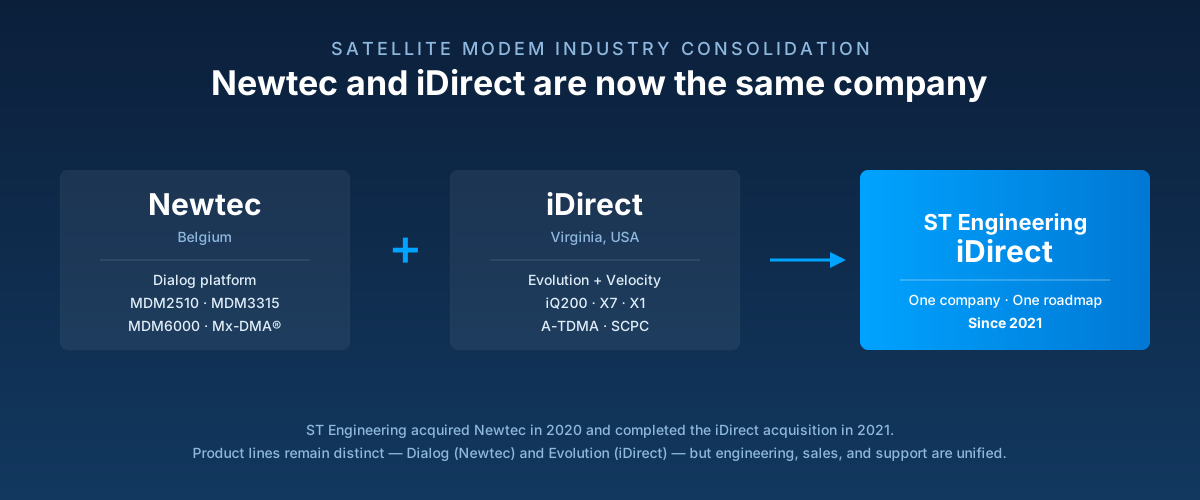
If you’re comparing Newtec and iDirect satellite modems for a UAE, KSA, or wider GCC deployment, there’s one thing you should know before you decide anything: since 2021, they’re the same company.
Newtec was acquired by ST Engineering in 2020. Then in 2021, ST Engineering completed its acquisition of iDirect. Both are now part of ST Engineering iDirect — one manufacturer, one roadmap, one support organisation.
That doesn’t mean the modems are interchangeable. Newtec’s platform (called Dialog) and iDirect’s legacy platform (called Evolution) are still distinct networks with different modems, and buyers regularly have to choose between them. But framing the decision as “Newtec vs iDirect” is now like asking whether you want a Toyota Corolla or a Lexus — different products, same parent.
This guide breaks down what’s actually different, which modem fits which use case, and how the choice looks from the UAE distributor perspective.
The 2020–2021 merger: what changed for buyers
For years, Newtec (based in Belgium) and iDirect (based in Virginia, USA) competed head-to-head in the enterprise VSAT market. Newtec built the Dialog platform. iDirect built the Evolution and Velocity platforms. Buyers had to pick a side because networks were closed to each other.
Then Singapore-based ST Engineering completed both acquisitions and unified them into ST Engineering iDirect in early 2021. Since then:
Newtec’s modem line kept its Dialog naming — MDM2510, MDM3315, MDM6000, MDM9000, plus SMB board-level variants.
iDirect’s Evolution and Velocity platforms remain in service — iQ series, X7, X1, plus network hubs.
The product roadmap is now consolidated. New development happens under one engineering organisation, and platforms are progressively converging.
All modems are sold as “ST Engineering iDirect” branded products, though older Newtec-branded and iDirect-branded stock is still in the channel.
For a buyer, this means: if you’re already on a Newtec Dialog network, you continue with Dialog modems. If you’re on iDirect Evolution, you continue with Evolution — for now — but the long-term direction is clear.
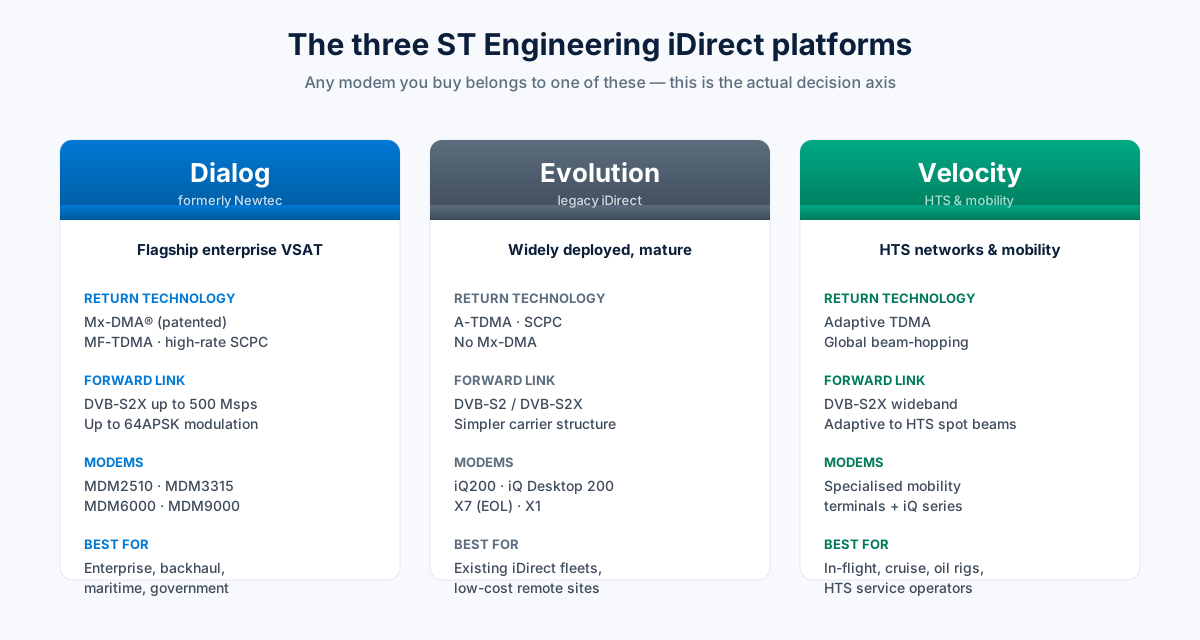
The three platforms explained
Any modem you’re evaluating belongs to one of three network platforms. This is the actual decision axis — not the brand name.
Dialog (formerly Newtec)
Dialog is the flagship multi-service platform. It’s designed for enterprise VSAT, cellular backhaul, maritime, and government applications. Its signature is Mx-DMA® — a return-link technology that combines the flexibility of MF-TDMA with the on-demand bandwidth allocation of SCPC. In practice, Mx-DMA gives Dialog networks better link efficiency and higher availability than pure MF-TDMA.
Dialog supports DVB-S2X wideband forward carriers up to 500 Msps, so a single hub can deliver hundreds of Mbps to remote sites.
Evolution (legacy iDirect)
Evolution is the older iDirect platform. It’s proven, widely deployed across corporate VSAT networks in the Middle East and Africa, and still fully supported. Its return technology is A-TDMA and SCPC, without Mx-DMA. Evolution modems are typically simpler and less expensive at the low end.
Some Evolution modems (like the X7) are approaching end-of-life status and are being replaced by Dialog equivalents (the MDM3315 in the X7’s case).
Velocity (iDirect HTS/mobility)
Velocity is iDirect’s platform for HTS (high-throughput satellite) networks and mobility applications — think in-flight connectivity, cruise ships, oil rigs. It uses DVB-S2X adaptive modulation with global beam-hopping support. Most enterprise buyers won’t touch Velocity; it’s built for HTS operators and mobility service providers.
Modem-by-modem comparison
Here are the modems most UAE buyers actually encounter, side by side:
Modem
Platform
Origin
Target Use
Peak Data Rate
Return Tech
MDM2510
Dialog
Newtec
SOHO / SME, POS
150 Mbps fwd
Mx-DMA, MF-TDMA
MDM3315
Dialog
Newtec
Enterprise, maritime, backhaul
150/70 Mbps
Mx-DMA MRC, MF-TDMA, SCPC
MDM6000
Dialog
Newtec
High-end enterprise, DTH contribution
500+ Mbps
Mx-DMA, SCPC
iQ200
Evolution
iDirect
SOHO / SME
~50 Mbps
A-TDMA
iQ Desktop 200
Evolution
iDirect
Desktop SOHO
~50 Mbps
A-TDMA
X7
Evolution
iDirect
Enterprise (EOL – succeeded by MDM3315)
90 Mbps
A-TDMA, SCPC
X1
Evolution
iDirect
Low-cost remote
~20 Mbps
A-TDMA
A few practical notes:
The MDM2510 and the iQ200 target the same market — small offices, retail, banking, POS networks. If you have a choice, MDM2510 gives you more headroom and modern Mx-DMA efficiency. iQ200 is often cheaper on the ground and easier to deploy on existing iDirect networks.
The MDM3315 replaces the X7. If a client has an X7 fleet, MDM3315 is the natural upgrade path. It offers a dual receiver, higher throughput, and a 4-port Ethernet switch versus the X7’s single receiver and simpler I/O.
The MDM6000 is a different animal. It’s not a competitor to the iQ200 or X7 — it’s for high-end backhaul and DTH contribution where you need 500 Msps+ of forward capacity.
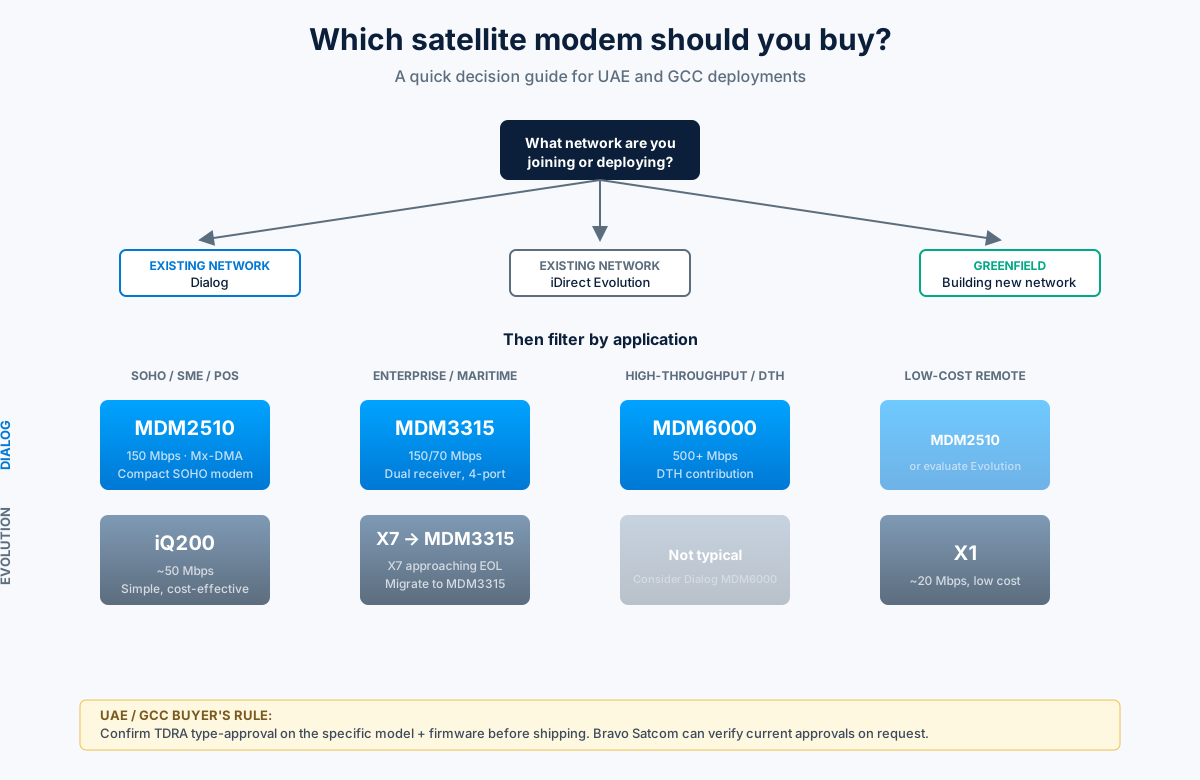
How to choose: a decision guide
The right modem depends less on brand preference and more on what network you’re joining.
If you’re joining an existing Dialog network (many enterprise VSAT operators in the Middle East run Dialog): you must buy a Dialog modem. Options: MDM2510 for SOHO, MDM3315 for enterprise, MDM6000 for high-throughput.
If you’re joining an existing iDirect Evolution network: you’ll typically buy an Evolution modem. Options: iQ200 or X1 for entry-level, X7 or MDM3315 for enterprise. Note that new Evolution deployments are becoming rare — most operators are migrating.
If you’re deploying a greenfield VSAT network (you’re setting up the hub too): Dialog is the strategic choice. Better roadmap, better return efficiency, aligned with ST Engineering iDirect’s future direction.
By application:
SOHO / retail / banking / POS: MDM2510 (Dialog) or iQ200 (Evolution). Both do the job. Choose based on the network you’re joining.
Enterprise fixed VSAT: MDM3315 on Dialog, or MDM3315 replacing X7 if you’re on Evolution and upgrading.
Maritime: MDM3315 or iQ200 with OpenAMIP support. Verify vessel-specific stabilization requirements.
Cellular backhaul: MDM3315 or MDM6000 depending on cell load.
Government / secure networks: MDM3315 with 256-bit AES option, or purpose-configured MDM6000.
UAE and GCC considerations
A few things matter specifically for buyers in the region:
TDRA type-approval. Any satellite terminal deployed in the UAE requires TDRA (Telecommunications and Digital Government Regulatory Authority) type-approval. All current ST Engineering iDirect modems have approvals in place, but confirm the specific model and firmware version with your distributor before shipping.
Regional satellite compatibility. Yahsat’s Al Yah 1, Al Yah 2, and Al Yah 3 (Ka-band HTS) are the dominant satellites for enterprise VSAT in the UAE. Dialog and Evolution modems both operate on these fleets — the network operator determines platform choice. Thuraya is a separate GEO/MSS system that doesn’t use these modems.
Support and lead times. Post-merger, spares and support for both Dialog and Evolution modems flow through ST Engineering iDirect’s regional partners. Working lead times from Europe or the US into JAFZA are typically 2–4 weeks for stock items, longer for configured modems that need factory provisioning.
Local availability.Bravo Satcom stocks the MDM2510, MDM3315, and iQ200 for UAE and GCC delivery, along with SMW LNBs, iLBs, ANT2025 and ANT2035 antennas from the wider Newtec/ST Engineering ecosystem. Contact us for current stock and lead times.
Frequently asked questions
Are Newtec and iDirect the same company?
Yes — since 2021. ST Engineering acquired Newtec in 2020 and iDirect in 2021, then unified them as ST Engineering iDirect. Both product lines continue under one brand.
Can iDirect Evolution modems work on a Newtec Dialog network?
No. Evolution and Dialog are separate network platforms. Modems are not cross-compatible. Choose the modem that matches your network hub.
Which modem is better for a UAE small-office VSAT?
The MDM2510 offers modern DVB-S2X and Mx-DMA return-link efficiency. The iQ200 is often cheaper and simpler to deploy on existing iDirect networks. If you’re joining a Dialog network, choose MDM2510. If you’re joining an Evolution network, choose iQ200.
What replaces the iDirect X7?
The MDM3315 is the direct replacement. It offers dual receivers, higher throughput, and a 4-port Ethernet switch while maintaining a familiar form factor for X7 users.
Where can I buy Newtec or iDirect modems in Dubai?
Bravo Satcom supplies both product lines to UAE and GCC customers with local warehousing and support. Contact us for a quote on MDM2510, MDM3315, iQ200, or any related VSAT equipment.
Is MDM2510 still in production in 2026?
Yes. It remains an active product in the ST Engineering iDirect Dialog portfolio for SOHO and SME deployments.
Bottom line
The “Newtec vs iDirect” question is now really “Dialog vs Evolution”, and increasingly the answer is Dialog for new deployments. But if you’re joining an existing network, the choice is usually made for you.
For UAE and GCC buyers, the practical shortlist is:
Small office / retail / POS: MDM2510 (or iQ200 if on Evolution)
Enterprise / maritime / backhaul: MDM3315
High-throughput / contribution: MDM6000
Contact Bravo Satcom for current stock, pricing, and TDRA-approval confirmation on any of these models.
Newtec وiDirect هما الاسمان الأكثر تكراراً حين يتعلق الأمر بأجهزة مودم VSAT الاحترافية في منطقة الشرق الأوسط وأفريقيا. كلاهما يُنتج أجهزة موثوقة وعالية الأداء — لكنهما يختلفان في البنية التقنية وفلسفة التصميم وبيئات التطبيق. هذا المقال يقارن بينهما بشكل موضوعي ليساعدك في اختيار المناسب لمشروعك.
ملاحظة: اندمجت Newtec وST Engineering iDirect عام 2020 تحت مظلة iDirect بعد استحواذ ST Engineering. المنتجان الآن تحت نفس المجموعة، لكنهما يُطوَّران ويُباعان بشكل مستقل مع قواعد عملاء مختلفة.
نظرة عامة سريعة
Newtec (Dialog)
iDirect (Evolution / Pulse)
المنشأ
بلجيكا — تأسست 1985
الولايات المتحدة — تأسست 1994
البنية الشبكية
SCPC وMF-TDMA وFlexACM
TDMA بشكل رئيسي (iNFINITI) + SCPC
نظام الإدارة
Dialog Hub
NMS (Network Management System)
القطاعات الرئيسية
البث، حركة الاتصالات عالية السرعة، المؤسسات
المؤسسات، القطاع الحكومي والدفاعي، النفط والغاز
نقاط القوة
كفاءة طيفية عالية، FlexACM، منخفض الكمون نسبياً
مرونة شبكية عالية، قاعدة تثبيت واسعة، دعم قوي
البنية التقنية: الفرق الجوهري
Newtec Dialog
Newtec Dialog منصة تعتمد على FlexACM (Adaptive Coding and Modulation) — وهي تقنية تُكيّف معدل تعديل الإشارة وتشفير تصحيح الخطأ بشكل مستمر بناءً على جودة الوصلة الآنية. النتيجة: استخدام أمثل للطيف الراديوي في كل الظروف الجوية. تتميز بدعم قوي لـ SCPC (قناة مخصصة لكل موقع) بما يُقلل الكمون مقارنةً بشبكات TDMA البحتة.
iDirect Evolution
iDirect Evolution تُبنى على بنية TDMA (Time Division Multiple Access) — تشارك المواقع الإرسال بنهج الدورة الزمنية المُدارة من المحور المركزي. هذه البنية تجعلها فعّالة للغاية في تسيير الحركة المتقطعة والشبكات الكبيرة ذات المواقع المتعددة التي تتفاوت احتياجاتها من الحجم الترددي.
مقارنة الأداء الرئيسي
المعيار
Newtec Dialog
iDirect Evolution
كفاءة الطيف
ممتازة — FlexACM يعظّم الاستخدام
جيدة — TDMA كفوء للشبكات الكثيفة
الكمون (Latency)
أقل نسبياً (SCPC يُتيح مسار مخصص)
أعلى قليلاً في TDMA بسبب جدولة الإرسال
البث (Broadcast)
قوي — مصمم تاريخياً للبث الفضائي
متوفر لكن ليس نقطة القوة الأساسية
تسيير حركة الإنترنت
جيد
ممتاز — TCP acceleration مدمج
شبكات المواقع المتعددة
جيد
ممتاز — TDMA مصمم لهذا
أجهزة المودم: مقارنة النماذج الشائعة
النموذج
الشركة
الاستخدام الرئيسي
Newtec MDM3100
Newtec
محطة مركزية SCPC/MF-TDMA
Newtec MDM2200
Newtec
محطة طرفية VSAT
iDirect 950mp
iDirect
محطة طرفية TDMA (الأكثر انتشاراً في المنطقة)
iDirect X7
iDirect
محطة طرفية TDMA فائقة الأداء
iDirect Velocity
iDirect
VSAT عالي السرعة للنقل والطيران والبحري
أيهما تختار؟
اختر Newtec إذا:
تحتاج وصلة SCPC مخصصة بكمون منخفض — تطبيقات VoIP عالية الجودة أو بيانات حساسة للتأخير
مشروعك في قطاع البث الفضائي أو توزيع المحتوى
الكفاءة الطيفية أولوية قصوى وميزانية الطيف مضغوطة
لديك مهندس يتقن إعداد منصات FlexACM/SCPC
اختر iDirect إذا:
تبني شبكة تضم مواقع متعددة ذات حركة متقطعة أو غير منتظمة
تحتاج شبكة مؤسسية واسعة في قطاع النفط والغاز أو الحكومي
تريد منصة مثبتة على نطاق واسع مع دعم تقني قوي في المنطقة
شركاء الخدمة والموردون في منطقتك يعملون أساساً على iDirect
في منطقة الشرق الأوسط: iDirect هو الأكثر انتشاراً في قطاعي النفط والغاز والحكومي. Newtec تحضر بقوة في مشاريع البث والاتصالات عالية الكثافة. كلاهما مدعوم محلياً من موزعين متخصصين في الإمارات والسعودية.
أسئلة شائعة
هل يمكن تشغيل مودم iDirect على شبكة Newtec؟ لا. المنظومتان تعتمدان على بروتوكولات طبقة الهواء (air interface) خاصة بكل منهما وغير متوافقة. يجب أن تكون المحطات الطرفية من نفس المنصة التي تعمل عليها محطة المركز (Hub).
ما الفرق بين iDirect Evolution وiDirect Velocity؟ Evolution هي المنصة الرئيسية للشبكات الثابتة. Velocity مُحسّنة لبيئات التنقل عالية السرعة: السفن، الطائرات، المركبات — وتدعم فئات أداء أعلى بكثير.
هل الاندماج بين Newtec وiDirect أثّر على دعم المنتجات؟ كلا المنتجين لا يزالان في التطوير والدعم النشط. لكن على المدى البعيد، من المتوقع أن يتقاربا تحت منصة موحدة تدريجياً ضمن مجموعة ST Engineering iDirect.
برافو ساتكوم — مورد معدات VSAT في الإمارات والخليج
نوفر معدات VSAT بما فيها أجهزة مودم وأطباق ومكونات خارجية (BUC/LNB) لشبكات iDirect وNewtec وغيرها. متوفر للتسليم في الإمارات ودول الخليج.
Pick the wrong RF connector and you create a mismatch that costs you signal, adds insertion loss, or fails mechanically in the field. N-Type, SMA, and BNC connectors are all used on 50Ω coaxial systems, they all look broadly similar to the uninitiated, and they are absolutely not interchangeable.
This guide covers the real differences — frequency limits, coupling mechanism, weatherproofing, size, and which connector belongs where — so you can make the right call on the next installation or procurement.
RF Connector Size Comparison — N-Type / SMA / BNC
N-Type
~23 mm hex
DC – 11 GHz
SMA
~8 mm hex
DC – 18 GHz
BNC
~15 mm bayonet
DC – 4 GHz
Relative sizes approximate — all 50Ω | bravosatcom.com
Quick Reference: N-Type vs SMA vs BNC
N-Type
SMA
BNC
Impedance
50Ω (or 75Ω variant)
50Ω (standard)
50Ω or 75Ω
Usable frequency
DC to 11 GHz
DC to 18 GHz
DC to 4 GHz
Coupling
Threaded (hex nut)
Threaded (1/4″-36 UNS)
Bayonet (quarter-turn)
Size
Large
Small
Medium
Weatherproof
Yes (with boot/seal)
Not inherently
No
Common use
VSAT IFL, antenna feedlines, base stations
Lab/bench RF, GPS modules, indoor radio
Test equipment, video (75Ω), legacy radio
Cable range
LMR-195 to LMR-900
LMR-100 to LMR-400
LMR-200 to LMR-400
Mating cycles
~500
~500 (precision: 1,000+)
~500
N-Type Connector
N-Type (or Type-N) was developed in the late 1940s for military communications — a lineage that tells you something about its design priorities. It is a large, threaded, weatherproof connector built for outdoor and high-power RF applications. The hex coupling nut locks securely and resists vibration, which is why it is still the connector of choice for antenna feedlines and VSAT installations decades later.
N-Type Specifications
Parameter
Value
Impedance
50Ω (75Ω variant available — not compatible with 50Ω)
Frequency range
DC to 11 GHz
Voltage rating
Up to 1,000 V peak (varies by manufacturer)
Interface standard
MIL-STD-348, IEC 169-16
Coupling
Threaded — hex nut, ~5/8″-24 UNS
Body material
Nickel-plated or stainless steel
Weatherproofing
Yes — gasket seal on mated pair; add self-amalgamating tape for outdoor installs
Where N-Type Is Used
VSAT IFL cable runs — The intermediate frequency link between the ODU and modem operates at L-band (950–2,150 MHz). N-type is the standard interface at both ends. At 1–2 GHz the connector’s 11 GHz headroom is irrelevant, but its weatherproofing and robust coupling are not.
Antenna feedlines and tower work — Any run from a base station radio to an antenna uses N-type. The cable is exposed to wind, UV, and rain; the connector needs to be too.
LMR-400 and larger cables — The physical dimensions of N-type suit the larger LMR cable families. An N-type crimp connector on LMR-400 is the most common termination combination in outdoor RF installations in the GCC.
High-power RF — When you are driving a power amplifier into an antenna and the cable carries high power, N-type’s voltage rating and low contact resistance matter. SMA and BNC are not appropriate at high power levels.
Watch for this: The 50Ω and 75Ω versions of N-type look almost identical. The 75Ω centre pin is slightly smaller and will fit loosely in a 50Ω socket — potentially damaging it. Always verify impedance before mating.
SMA Connector
SMA (SubMiniature version A) was designed in the 1960s for microwave frequencies where physical size affects electrical performance. It is significantly smaller than N-type, uses a precision 1/4″-36 threaded coupling, and is rated to 18 GHz in standard form — making it the default for microwave and laboratory applications.
SMA Specifications
Parameter
Value
Impedance
50Ω
Frequency range
DC to 18 GHz (standard)
Frequency range (precision/3.5 mm)
DC to 26.5 GHz
Voltage rating
Up to 500 V
Interface standard
MIL-STD-348B, IEC 169-15
Coupling
Threaded — 1/4″-36 UNS hex nut
Body material
Brass (gold or nickel plated) or stainless steel
Weatherproofing
No — indoor/bench use by default
Where SMA Is Used
GPS and GNSS equipment — Nearly all GPS receiver modules and antennas use SMA or RPSMA. If you are running GPS cables to a VSAT terminal, modem, or asset tracking unit, you are dealing with SMA.
Indoor radio and wireless equipment — Small form-factor radios, modems, and routers in the 2.4 GHz, 5 GHz, and sub-6 GHz bands use SMA or RPSMA.
Test and measurement above 11 GHz — For measurements in Ku-band and above, SMA is the only option among these three connectors.
Two things to get right with SMA: 1. Torque: Finger-tight plus a quarter-turn with a 5/16″ spanner. Overtightening deforms the centre pin interface and kills return loss. 2. Standard vs reverse-polarity (RPSMA): In standard SMA the male plug carries the centre pin. In RPSMA the male plug has the socket. Same thread, different gender — forcing them together causes expensive damage.
BNC Connector
BNC (Bayonet Neill–Concelman) is quick to connect and disconnect — one quarter-turn to lock — which is its main advantage. It was widely used in legacy radio, test equipment, and broadcast video. The bayonet mechanism is fast but does not thread, so it cannot be torqued down and provides no environmental sealing.
BNC Specifications
Parameter
Value
Impedance
50Ω or 75Ω
Frequency range
DC to 4 GHz (practical limit for 50Ω)
Voltage rating
Up to 500 V
Interface standard
MIL-PRF-39012, IEC 169-8
Coupling
Bayonet — quarter-turn lock
Body material
Nickel-plated or gold-plated brass
Weatherproofing
No
Where BNC Is Used
Test equipment and oscilloscopes — BNC is the standard probe interface on oscilloscopes and most benchtop instruments below 1 GHz.
Broadcast video (75Ω) — The 75Ω BNC variant is the universal interface for HD-SDI video cabling. These look identical to 50Ω BNC but are not electrically compatible.
Network timing and 10 MHz reference signals — GPS disciplined oscillators (GPSDO) and network timing equipment typically output 10 MHz reference on BNC.
BNC limitations to know: The 4 GHz frequency ceiling is firm — do not use BNC at Ku-band frequencies. And 50Ω vs 75Ω BNC look identical and are the most commonly confused connector variants in the field. Check impedance before connecting to test equipment.
How to Choose: Decision Guide
By Application
Application
Connector
VSAT IFL run (L-band, ODU to modem)
N-Type
Satellite antenna feedline (outdoor)
N-Type
BUC or LNB RF port
N-Type
Base station antenna cable
N-Type
GPS antenna cable
SMA (or RPSMA — check equipment port)
Indoor radio / WiFi equipment
SMA or RPSMA
Microwave test and measurement
SMA
Oscilloscope / signal generator under 1 GHz
BNC
HD-SDI broadcast video
BNC 75Ω
Network timing / 10 MHz reference
BNC
By Frequency
Usable Frequency Range
N-Type
DC — 11 GHz
SMA
DC — 18 GHz (26.5 GHz precision)
BNC
DC — 4 GHz
04 GHz11 GHz18 GHz
bravosatcom.com
By Environment
Environment / Requirement
Best Choice
Outdoor / weatherproof required
N-Type (with boot or self-amalgamating tape)
Indoor bench / lab
SMA or BNC depending on frequency
Quick connect/disconnect cycles
BNC (bayonet is faster than threading)
Vibration-prone installation
N-Type or SMA (threaded coupling holds; bayonet can work loose)
Adapters: When You Have the Wrong Connector
Adapters between connector types are available and widely used, but they add insertion loss and reflections at higher frequencies. Keep adapters to one per signal path and do not use them on a connector you mate and unmate frequently — the wear happens on the adapter body.
Adapter
When You Need It
N-Type Female → SMA Male
SMA-tailed GPS antenna to N-type modem input
N-Type Male → BNC Female
Interfacing RF equipment to legacy test instruments
SMA Female → BNC Male
Lab bench bridging
N-Type 50Ω → N-Type 75Ω
Do not do this. Centre pin sizes differ; mating them can damage the socket.
What Cables Work With Each Connector
For VSAT and radio installations, the Times Microwave LMR series covers most cable runs. Here is how the connectors map to common LMR cables:
Cable
N-Type
SMA
BNC
LMR-100A
Not standard
✅ Common
—
LMR-195
✅ Available
✅ Common
✅ Available
LMR-240
✅ Common
✅ Available
✅ Available
LMR-400
✅ Primary
✅ Available
✅ Available
LMR-600
✅ Primary
—
—
LMR-900
✅ Primary
—
—
See the LMR-400 vs LMR-600 comparison for guidance on which cable to specify for a given IFL distance and frequency. If you are terminating N-type on LMR cable yourself, the step-by-step LMR crimp guide covers strip dimensions, tooling, and common mistakes.
Summary
N-Type, SMA, and BNC serve different roles in RF systems. N-Type is the outdoor, high-power, weatherproof choice for antenna feedlines and VSAT IFL runs. SMA handles microwave frequencies up to 18 GHz and belongs on indoor equipment, GPS cabling, and test benches. BNC is a legacy quick-connect connector suited to sub-4 GHz test equipment and broadcast video. Using the wrong one means you are either over-specifying and paying for it, or under-specifying and paying for it later in a fault call.
Need cables or connectors for your installation?
Bravo Satcom supplies RF coaxial cables and connectors — N-type, SMA, BNC — for VSAT, radio, and satellite installations in the UAE and GCC.
ثلاثة موصلات تجدها في كل مشروع اتصالات: N-Type، وSMA، وBNC. بنيتها متشابهة — موصل مركزي محاط بمعاوقة 50 أوم وغلاف خارجي — لكن لكل منها مواصفات ومجالات تطبيق مختلفة. اختيار الموصل الخاطئ يعني إما خسارة إشارة إضافية، أو موصلاً لا يناسب التردد، أو مشكلة ميكانيكية في التركيب.
هذا الدليل يشرح كل موصل بالأرقام وبمنطق الاختيار.
موصل N-Type
موصل N-Type (نوع N) هو الخيار القياسي لمعظم تطبيقات VSAT والراديو الأساسية والاتصالات الخارجية.
المواصفات الرئيسية
الخاصية
N-Type
المعاوقة
50 أوم (نسخة 75 أوم للتلفزيون فقط)
أقصى تردد تشغيل
18 غيغاهرتز (عادةً 11 غيغاهرتز عملياً)
أقصى استطاعة RF
~300–1000 واط (يعتمد على التردد)
نوع التثبيت
ملتوي (threaded) — يصمد على الاهتزاز
حماية من الرطوبة
جيدة — مناسب للتركيب الخارجي
الحجم
كبير نسبياً — قطر ~16 ملم
متى تستخدم N-Type
مسارات IFL للـ VSAT بين المودم والـ BUC/LNB
كابلات التغذية لأبراج الراديو ثنائي الاتجاه
التطبيقات الخارجية التي تحتاج حماية من الطقس
الوصلات على كابلات LMR-400 وLMR-600
أي تطبيق يتجاوز 3 غيغاهرتز ويحتاج موصلاً موثوقاً ميكانيكياً
N-Type هو الخيار الأول في تطبيقات VSAT. إذا كنت تعمل على كابل IFL أو كابل هوائي خارجي، فهذا موصلك في الغالب.
موصل SMA
SMA (Sub-Miniature Version A) موصل صغير الحجم، مصمم للتطبيقات عالية التردد في بيئات مدمجة.
المواصفات الرئيسية
الخاصية
SMA
المعاوقة
50 أوم
أقصى تردد تشغيل
18 غيغاهرتز (SMA قياسي)، 26.5 غيغاهرتز (SMA+)
أقصى استطاعة RF
~25–100 واط (يعتمد على التردد)
نوع التثبيت
ملتوي — لكن بحجم أصغر وأكثر هشاشة من N-Type
حماية من الرطوبة
ضعيفة — مناسب للتطبيقات الداخلية
الحجم
صغير جداً — قطر ~7 ملم
متى تستخدم SMA
وصلات المعدات داخل خزائن التجهيزات (patch panel connections)
وصلات قصيرة على لوحات RF ومعدات الاختبار
معدات الميكروويف والـ SDR والأجهزة المدمجة
التطبيقات التي تحتاج تردداً فوق 11 غيغاهرتز في بيئة مدمجة
لا تستخدم SMA على مسارات كابل IFL طويلة — الموصل صغير الحجم يعني خسارة إدراج أعلى ومقاومة ميكانيكية أقل. استخدمه لوصلات قصيرة داخل المعدات فقط.
موصل BNC
BNC (Bayonet Neill-Concelman) يتميز بنظام تثبيت سريع (باليونيت) بدلاً من اللولب.
BNC ليس خياراً لتطبيقات VSAT أو الاتصالات الخارجية. قيده التردد (4 غيغاهرتز) وحمايته المحدودة من الطقس يجعله مخصصاً للاستخدامات الداخلية والمختبرية.
مقارنة سريعة: N-Type مقابل SMA مقابل BNC
N-Type
SMA
BNC
أقصى تردد
18 غيغاهرتز
18–26 غيغاهرتز
4 غيغاهرتز
أقصى استطاعة
عالية (300W+)
منخفضة (~25W)
متوسطة (~80W)
الحماية من الطقس
جيدة
ضعيفة
ضعيفة
نظام التثبيت
لولبي
لولبي
بايونيت
التطبيق الرئيسي
VSAT، راديو خارجي
معدات مدمجة، مختبر
اختبار، CCTV
الاستخدام مع LMR
نعم (شائع)
نعم (وصلات قصيرة)
نعم (نادر)
هل يمكن التوصيل بين أنواع مختلفة؟
نعم، بواسطة محوّلات (adapters). الشائع: محوّل N-Type إلى SMA لتوصيل كابل LMR بمعدات صغيرة الحجم. لكن كل محوّل يُضيف خسارة إدراج (~0.1–0.3 ديسيبل) ونقطة ضعف إضافية في الوصلة. صمم منظومتك لتستخدم نوعاً واحداً من الموصلات قدر الإمكان.
موصلات RF في برافو ساتكوم
نوفر موصلات N-Type وSMA وBNC بأحجام LMR-400 وLMR-600 وغيرها، إلى جانب المحوّلات (adapters) اللازمة. متوفر للتسليم في الإمارات ودول الخليج.
سلسلة LMR من Times Microwave Systems هي المرجع الصناعي في كابلات التردد الراديوي المرنة منذ عقود. تجدها في محطات VSAT، منظومات الراديو ثنائي الاتجاه، أبراج الاتصالات، التطبيقات الدفاعية، وكل مكان يُهم فيه أداء الإشارة الراديوية. هذا الدليل يغطي الأنواع المتاحة، المواصفات الجوهرية، وأيها يناسب تطبيقك.
نظرة عامة على سلسلة LMR
كابلات LMR هي كابلات محورية مرنة بمعاوقة 50 أوم، مصممة لتعمل من الترددات المنخفضة حتى ما يزيد على 10 غيغاهرتز. جميعها تشترك في بنية متماثلة: موصل مركزي من الألومنيوم المطلي بالنحاس، عازل داخلي من بولي إيثيلين رغوي، شريط معدني لاصق + شبك نحاسي، وغلاف خارجي أسود مقاوم للأشعة فوق البنفسجية.
ما يتباين بين الأنواع هو القطر — وهو الذي يحدد التخميد والمرونة والوزن.
مقارنة كاملة لأنواع LMR الشائعة
النوع
القطر
الوزن
أدنى نصف قطر انحناء
التخميد عند 1500 ميغاهرتز
المسافة القصوى
LMR-100A
2.79 ملم
~0.02 كجم/م
12 ملم
~18.5 ديسيبل/30م
5–8م
LMR-200
4.95 ملم
~0.04 كجم/م
14 ملم
~7.5 ديسيبل/30م
15–20م
LMR-240
6.10 ملم
~0.05 كجم/م
19 ملم
~5.8 ديسيبل/30م
20–30م
LMR-400
10.3 ملم
~0.10 كجم/م
25 ملم
~3.5 ديسيبل/30م
50–75م
LMR-600
15.0 ملم
~0.19 كجم/م
38 ملم
~2.2 ديسيبل/30م
100–130م
LMR-900
22.2 ملم
~0.37 كجم/م
57 ملم
~1.5 ديسيبل/30م
150–200م
LMR-1200
30.0 ملم
~0.63 كجم/م
76 ملم
~1.0 ديسيبل/30م
200م+
ملاحظة: بيانات التخميد تقريبية مبنية على مواصفات Times Microwave الرسمية. للحسابات الدقيقة، استخدم حاسبة Loss Budget رسمية أو وثيقة المواصفات.
LMR-100A وLMR-200: وصلات الربط القصيرة
هذان النوعان الأصغر يتميزان بمرونة عالية وقطر صغير، مما يجعلهما مثاليين لوصلات الربط الداخلية بين المعدات في خزائن التجهيزات، والتوجيه عبر الأنابيب الضيقة والأرفف المكتظة.
لا تستخدمهما على مسارات يزيد طولها عن 15 متراً في تطبيقات VSAT — التخميد يصبح مشكلة حقيقية سريعاً.
LMR-240: نقطة التوازن للتطبيقات المدمجة
LMR-240 يقدم توازناً جيداً بين المرونة والأداء لمسارات تصل إلى 25 متراً. يُستخدم كثيراً في محطات الراديو ثنائي الاتجاه المحمولة ومنظومات الهوائيات في المركبات.
LMR-400: المعيار الصناعي
LMR-400 هو الكابل الأكثر استخداماً في تطبيقات VSAT والراديو الأساسية في جميع أنحاء العالم. يجمع بين أداء منخفض الخسارة، مرونة كافية للتوجيه، ووزن يُمكن التعامل معه على الأسطح والأبراج.
مسارات IFL للـ VSAT (أقل من 75م)
تغذية الراديو ثنائي الاتجاه من المحطة الأساسية إلى الهوائي
معظم التطبيقات الخارجية حتى 50 متراً
LMR-600: للمسارات الطويلة
حين يتجاوز مسارك 50 متراً أو تكون ميزانية الخسارة مضغوطة، LMR-600 هو الخطوة التالية. أثقل وأصلب من LMR-400، لكن التخميد المنخفض يبرر ذلك في المسارات الطويلة.
LMR-900 وLMR-1200: للمحطات الأرضية الكبيرة
هذه الأحجام الكبيرة مخصصة للمحطات الأرضية والتطبيقات الثابتة ذات المسارات الطويلة جداً. تركيبها يستلزم أدوات متخصصة ومعدات دعم كبيرة.
الإصدارات الخاصة ضمن سلسلة LMR
الإصدار
الخاصية الإضافية
متى تختاره
LMR-XXX-DB
غلاف مقاوم للماء (Flooded)
التركيبات المدفونة في التربة
LMR-XXX-FR
مقاوم للحريق (Plenum/Riser)
داخل المباني حيث تُشترط مقاومة الحريق
LMR-XXX-75
معاوقة 75 أوم
التلفزيون الفضائي الاستهلاكي DTH فقط
مهم: كابلات LMR-75 غير متوافقة مع معدات VSAT القياسية. جميع أجهزة مودم VSAT تستخدم 50 أوم. تأكد من المواصفة قبل الطلب.
كيف تختار الحجم المناسب
طول المسار
التردد
الاختيار الموصى به
أقل من 10م
أي
LMR-240 أو LMR-400
10–50م
حتى 6 غيغاهرتز
LMR-400
50–100م
نطاق Ku/IF
LMR-600
100–150م
نطاق Ku/IF
LMR-900
أكثر من 150م
أي
LMR-1200 أو ألياف ضوئية
كابلات LMR من Times Microwave في برافو ساتكوم
نستوك الطيف الكامل من كابلات LMR من LMR-400 إلى LMR-600، مع الموصلات المناسبة لكل نوع. متوفر للتسليم في الإمارات ودول الخليج.
A poorly terminated connector is the number one cause of signal degradation on an otherwise well-designed RF installation. LMR cables — particularly LMR-400 — are used on VSAT IFL runs, radio base station feedlines, and outdoor antenna installations where the connector is exposed to weather, vibration, and long-term stress. Getting the crimp right the first time saves you a troubleshooting call six months later.
This guide walks through the complete termination process for LMR-400 with an N-type crimp connector — the most common combination in VSAT and radio work — and covers the critical dimensions, tools, and mistakes that separate a reliable termination from a future fault.
LMR-400 Cable Preparation — Strip Stages
Jacket
Full length
Braid exposed
25.4 mm
(fold back)
Dielectric
12.7 mm
(stripped)
Centre pin
12.7 mm
exposed
Outer jacket (PE)
Braid + foil shield
Foam PE dielectric
Copper centre conductor
LMR-400 N-type crimp | Dimensions per Times Microwave spec | bravosatcom.com
What You’ll Need
Getting the right tools matters more than most people realise. Undersized or worn tooling causes crimp failures that are invisible to the eye but catastrophic for RF performance.
Tool
Purpose
Notes
Coax cable cutter
Clean, square cable cut
Never use wire cutters or a hacksaw — both distort the cable end
Rotary coax stripper
Strip jacket, braid, dielectric to exact dimensions
Set blade depths for LMR-400 specifically
Hex crimp tool + die
Compress ferrule onto braid
LMR-400 N-type typically requires 0.429″ hex die — check connector spec
Utility knife / deburring tool
Clean dielectric end, remove stray braid strands
Vernier calipers
Verify strip dimensions
Optional but recommended for critical installs
Multimeter
Post-crimp continuity test
Mandatory before putting the cable into service
Connector types: This guide covers crimp connectors — the most common in field work. Times Microwave also makes EZ-400 compression connectors (faster, single-action, requires the matching tool) and solder-type connectors. The cable prep dimensions are similar but confirm against your specific connector’s installation sheet.
Strip Dimensions for LMR-400 N-Type Crimp
These are the published Times Microwave strip dimensions for LMR-400 with a standard N-type crimp connector. Write these on your tool bag if you do this regularly.
Strip
Dimension
What It Exposes
Outer jacket removal
25.4 mm (1.00″)
Braid for fold-back
Braid fold-back point
12.7 mm (0.50″) from jacket end
Positions braid over ferrule
Dielectric removal
12.7 mm (0.50″) from fold point
Centre conductor
Centre conductor trim
Flush with connector pin face
Clean mating contact
Dimensions vary between connector manufacturers. Always cross-check against your specific connector’s installation sheet before terminating.
Step-by-Step: N-Type Crimp on LMR-400
1
Cut the cable square. Use a proper coax cutter. The cut must be clean, flat, and perpendicular. Inspect: jacket, braid, dielectric, and centre conductor must all be concentric and undamaged. Any burr or angle — cut again.
2
Slide on the crimp ferrule first. Before stripping anything, slide the crimp ferrule (small metal ring) onto the cable with the open end facing the cable end. This is the most commonly forgotten step. You cannot install it after the connector body is on.
3
Strip the outer jacket — 25.4 mm. Set your rotary stripper and rotate 2–3 times, then pull the jacket off cleanly. Inspect the braid — intact, no nicks, no cut strands. Remove any cut braid strands before proceeding.
4
Fold back the braid — at 12.7 mm. Comb the braid wires back evenly over the outer jacket. Spread uniformly around the full circumference — avoid bunching. Bunched braid concentrates crimp force on one side and reduces shield effectiveness.
5
Strip the dielectric — 12.7 mm. Remove foam dielectric to expose the centre conductor. The cut must be clean — no gouges or teeth marks on the copper. Even minor nicks increase PIM and create stress crack points under vibration.
6
Inspect before assembly. Blow out loose strands. Verify strip dimensions. Confirm no braid strands are on the dielectric. Check the centre conductor is round and undamaged. A 30-second inspection here prevents a re-termination in the field.
7
Install the connector body. Slide the connector body onto the cable. The centre conductor passes through the contact pin and protrudes slightly — trim flush with the pin face. The braid seats inside the connector’s braid seat area. Push fully home until it seats firmly.
8
Slide the ferrule into position. Slide the crimp ferrule forward until it butts against the rear of the connector body, sitting over the folded braid.
9
Crimp. Place the ferrule in the correct hex die. Close the handles with a single smooth, firm stroke until the ratchet releases. One complete ratchet cycle only — do not over-crimp (distorts the body) or under-crimp (ferrule slips).
10
Inspect the finished crimp. The ferrule should be uniformly hexagonal, no cracking or oval distortion. Firm tug — connector should not move. No braid strands protruding. Centre pin flush or just proud of the mating face.
Common Mistakes
Mistake
Consequence
Fix
Forgetting the ferrule before assembly
Must cut off connector and restart
Slide ferrule on as Step 2, every time
Nicked centre conductor
PIM, cracking under vibration, future open
Re-cut cable end and re-terminate
Stray braid strands on dielectric
Dead short centre-to-outer
Inspect under good light before inserting body
Wrong hex die size
Under-crimp — passes pull test, fails in field
Always match die to connector spec sheet
Bunched braid fold
Non-uniform crimp, reduced shield coverage
Comb braid evenly around full circumference
Centre pin too long
Bottoms out in mating connector, damages both
Trim flush with pin face
RG-8 connector on LMR-400
Wrong bore — mechanically and electrically poor
Always use connectors specified for LMR-400
Testing Your Termination
Every terminated connector should pass three checks before the cable goes into service:
① Visual Inspection
Ferrule uniformly hexagonal. No braid strands protruding. Centre pin flush. Connector firmly seated — no movement under hand tug.
② DC Continuity (Multimeter)
Centre pin to centre pin: continuity. Centre pin to outer body: open circuit. Any short = failed termination, re-terminate.
③ Return Loss / VSWR (if available)
Good LMR-400 termination: >25 dB return loss (VSWR <1.12:1) at 1 GHz. Worse than 20 dB (VSWR >1.22:1) indicates a problem.
Connector Compatibility Quick Reference
Always match the connector spec to your cable. Using an LMR-400 connector on LMR-600 is the most common ordering mistake.
Can I reuse an LMR connector after removing it?
No. Once a crimp ferrule has been compressed, it cannot be re-used. Cut the connector off, re-prepare the cable end, and use a new connector.
What’s the minimum pull-out force for a properly crimped LMR-400 connector?
Times Microwave specifies approximately 45 kg (100 lbs) minimum pull-out strength for a correctly crimped LMR-400 N-type. If yours pulls off with hand force, the crimp failed.
Can I use a standard N-type connector meant for RG-8 on LMR-400?
No. LMR-400 has a different OD, braid construction, and dielectric. Using an RG-8 connector produces a mechanically and electrically poor termination. Always specify connectors made for LMR-400.
How do I know if my crimp tool die is worn?
A worn die produces ferrules that are out-of-round or show uneven hex faces. Check with calipers — if in doubt, replace the die. A worn die is cheaper to replace than a failed installation.
What’s the difference between silver and gold centre pins?
Silver-plated pins are standard for VSAT work. Gold pins appear in some lower-frequency or high-reliability connectors. For LMR-400 N-type in VSAT IFL work, silver-plated is correct.
Need LMR Cables and Connectors?
Bravo Satcom supplies Times Microwave LMR cables and N-type connectors for VSAT and radio installations across the UAE and GCC. We stock LMR-240, LMR-400, and LMR-600 with matching crimp and compression connectors.
تثبيت موصل على كابل LMR — إذا فعلته خطأ، ستحصل على وصلة ضعيفة ومتذبذبة الأداء لسنوات. إذا فعلته صحيحاً، يصمد الموصل عقوداً. هذا الدليل يشرح الطريقة الصحيحة لتثبيت موصلات LMR بالتفصيل الكافي لتنفيذ الخطوة الأولى بثقة.
قبل البدء: كل كابل LMR يحتاج موصلات بحجمه الخاص. موصلات LMR-400 لا تناسب LMR-600 والعكس. تأكد من المطابقة قبل شراء أي شيء.
الأدوات والمواد المطلوبة
العنصر
الاستخدام
ملاحظة
قاطع مقشر LMR متعدد المراحل
تقشير الكابل بالأعماق الصحيحة
حدد النوع المناسب لقطر كابلك
عدة كريمب (ضغط) LMR
تثبيت الحلقة الخارجية
تأكد من التوافق مع حجم الموصل
قاطع كابل دائري
قطع الكابل بشكل عمودي نظيف
يُفضَّل على قاطع السلك العادي
ريمر (محرر أسلاك)
توسيع الغلاف الخارجي
مدرج في كثير من عدد المقشر
موصل LMR المناسب
نوع N أو TNC أو SMA — بحجم كابلك
أصيل من Times Microwave دائماً
الخطوات: تثبيت موصل EZ من Times Microwave
موصلات EZ من Times Microwave هي الأكثر شيوعاً مع كابلات LMR المرنة. الطريقة تعتمد على الدفع والضغط دون لحام.
قطع الكابل بشكل عمودي نظيف استخدم قاطعاً دائرياً للحصول على قطع مستقيم تماماً. أي ميل في القطع سيسبب مشكلة في سوية الموصل المركزي.
تقشير الكابل بالأعماق الصحيحة ضع الكابل في المقشر متعدد المراحل وأدره باتجاه عقارب الساعة حتى يصطدم بالتوقف الداخلي. المقشر الجيد يزيل الغلاف الخارجي، الشبك الخارجي، وجزءاً من الشريط المعدني، مع الإبقاء على العازل الداخلي وإبراز الموصل المركزي — كل ذلك في دفعة واحدة.
توسيع الشبك الخارجي استخدم الريمر لتوسيع الشبك المعدني إلى الخارج بزاوية 45 درجة. الهدف أن يكون الشبك واسعاً بما يكفي لدفع الجسم الداخلي للموصل من خلاله، ثم يُعاد طيه إلى الخارج ليُضغط بواسطة الحلقة الخارجية.
دفع الموصل على الكابل أدخل الجسم الداخلي للموصل (الدبوس + الجسم الداخلي) داخل الكابل من جهة الموصل المركزي. ادفع باستمرار حتى يخرج الموصل المركزي من الفتحة الأمامية وتلامس حافة الجسم الداخلي نهاية الغلاف الخارجي.
تحضير الحلقة الخارجية أمرر الحلقة الخارجية (المسننة) على الكابل قبل الضغط. إذا نسيتها قبل الضغط ستضطر لقطع الموصل وإعادة البدء من الصفر.
الضغط (Crimping) ضع الحلقة الخارجية في العدة وأغلقها بثبات حتى النهاية. يجب أن تصدر نقرة واضحة عند اكتمال الضغط. لا توقف الضغط في المنتصف — الضغط غير المكتمل يعطي وصلة هشة.
التحقق من الجودة تأكد بصرياً أن: الموصل المركزي بارز بالطول الصحيح (لا مقطوع ولا طويل جداً)، الشبك مضغوط بالكامل داخل الحلقة، الكابل لا يتحرك عند الشد اليدوي المعتدل.
الأخطاء الشائعة وكيفية تجنبها
الخطأ الأول: قطع الموصل المركزي. يحدث هذا حين يكون عمق التقشير غير دقيق. الحل: استخدم مقشراً مدرجاً مصنوعاً للكابل نفسه — لا تحاول التقشير يدوياً بسكين.
الخطأ الثاني: الشبك غير المنتشر بشكل كافٍ. إذا دفعت الموصل دون توسيع الشبك أولاً، سينكسر الشبك داخل الموصل بدلاً من الالتفاف حوله. خذ وقتك في خطوة توسيع الشبك.
الخطأ الثالث: نسيان الحلقة الخارجية. ضع الحلقة على الكابل قبل دفع الموصل، ليس بعده.
نصيحة الاختبار: بعد التثبيت، اقس انعكاس الموصل (VSWR) بمقياس VNA أو مقياس الخسارة الانعكاسية. موصل LMR-400 جيد يجب أن يعطي VSWR أقل من 1.15:1 حتى 3 غيغاهرتز.
اختيار الموصل الصحيح مع كابل LMR
نوع الكابل
نوع الموصل
التطبيق الشائع
LMR-400
N-Type (ذكر/أنثى)
VSAT، محطات راديو ثنائي الاتجاه
LMR-400
TNC (ذكر/أنثى)
معدات عسكرية واتصالات محمولة
LMR-400
SMA (ذكر/أنثى)
وصلات المعدات والأجهزة
LMR-600
N-Type (ذكر/أنثى)
مسارات IFL طويلة، محطات أرضية
في تطبيقات VSAT، موصل N-Type هو المعيار على مسارات IFL. استخدم TNC إذا كانت المعدات تستدعي ذلك، وتجنب SMA على مسارات يزيد طولها عن بضعة أمتار بسبب خسارة الإدراج الأعلى.
موصلات وكابلات LMR في برافو ساتكوم
نوفر كابلات LMR من Times Microwave وموصلات N وTNC وSMA وBNC بجميع الأحجام المناسبة لـ LMR-400 وLMR-600. متوفر للتسليم في الإمارات ودول الخليج.
Every RF and satellite engineer hits this fork eventually: you’re designing a cable run and someone asks, “should we go fiber?” The right answer depends almost entirely on what the cable is carrying. If it’s connecting a modem to a BUC or LNB, the answer is always coaxial — no exceptions. If it’s a data backbone between buildings, fiber is almost certainly the better call.
This guide breaks down the key differences between fiber optic and coaxial cable and gives you a clear framework for choosing the right one every time.
Fig 1. Cable cross-section comparison: coaxial (LMR-400) vs single-mode fiber optic (SMF OS2). The critical difference for VSAT installations — coaxial cable carries DC power to the BUC and LNB alongside the RF signal; fiber cannot.
What Is Coaxial Cable?
Coaxial cable carries RF signals as electrical waves along a center copper conductor, insulated from a surrounding braid or foil shield by a dielectric foam core. The shield keeps the signal contained and blocks external interference from entering. An outer PE or PVC jacket provides mechanical and weather protection.
In VSAT and satellite applications the most common types are LMR-400 (standard Ku-band IFL, runs to ~30m), LMR-600 (medium runs to ~60m), LMR-900 (long runs to 80m+), and legacy RG214. For broadcast and CATV distribution, 75Ω RG6 is common.
The capability that makes coaxial indispensable for satellite work: it carries DC power alongside the RF signal. The same cable that carries your IF signal from modem to LNB also delivers the 13V or 18V DC that powers the LNB — plus the 22 kHz polarisation tone — and the 24–48V DC that drives the BUC. No other single cable can do this.
What Is Fiber Optic Cable?
Fiber optic cable carries signals as pulses of light through a glass core, surrounded by cladding (a lower-refractive-index glass layer that traps light inside by total internal reflection), a protective buffer coating, and an outer jacket. There are no copper conductors — signals travel at the speed of light with virtually no attenuation over distance.
Two main types exist: single-mode fiber (SMF, OS1/OS2) for long-distance runs up to 40+ km, and multi-mode fiber (MMF, OM3/OM4) for shorter data links up to ~300m. For telecom and data center backbone, SMF OS2 is the current standard.
The defining advantages: attenuation of just 0.2 dB/km at 1550 nm (vs approximately 30 dB/100m for LMR-400 at Ku-band), complete immunity to electromagnetic interference, and effectively unlimited bandwidth. The defining limitation: fiber cannot carry DC power. Any powered equipment at the far end requires a separate power cable.
Fiber Optic vs Coaxial Cable: Full Comparison
Feature
Coaxial Cable (LMR-400)
Fiber Optic (SMF OS2)
Signal medium
Electrical (RF waves)
Light (photons)
Attenuation @ 1 GHz
6.8 dB / 100m
0.035 dB / 100m
Attenuation @ Ku-band (12 GHz)
~30 dB / 100m
N/A — light, not RF
Max practical IFL run (Ku-band)
30m (LMR-400) · 60m (LMR-600) · 80m (LMR-900)
Not suitable for IFL
Max data run
~50m (10GBaseT, Cat6A)
40+ km (SMF)
EMI immunity
Partial (braid reduces, does not eliminate)
Complete — immune to all EMI
DC power over cable
✓ Yes — LNB 13/18V, BUC 24–48V
✗ No — separate power cable required
RF signal (native)
✓ Yes
✗ No — requires RF-to-optical conversion
Bandwidth
DC to 40 GHz (LMR-600)
Practically unlimited (>100 THz)
Field termination
Easy — crimp tool, N-type / SMA / BNC
Requires fusion splicer + cleaver
Cable cost
Lower
Higher
Weight
Heavier
Very light
Minimum bend radius
25mm (LMR-400)
30mm (standard OS2)
Security
Can be passively tapped
Tap causes detectable signal loss
Ground loop / surge risk
Yes — copper conductor
None — glass is non-conductive
When to Use Coaxial Cable
✓ Coaxial is the right choice for:
1. VSAT and satellite IFL runs — Mandatory. Your satellite modem must deliver DC power to the LNB (13V/18V + 22 kHz polarisation tone) and BUC (24–48V) through the same cable that carries the IF signal. Use LMR-400 up to 30m, LMR-600 to 60m, LMR-900 to 80m+ at Ku-band.
2. Two-way radio and base station antenna feedlines — VHF/UHF antenna connections are always coaxial. LMR-400 is the standard for fixed base station installations.
3. RF signal distribution — Splitters, combiners, amplifiers, RF patch panels: anywhere you’re routing or processing a live RF signal, coaxial connections are required throughout the chain.
4. Short runs under 40–50 meters — For L-band and below, coax is simpler, cheaper, and easier to terminate. The attenuation penalty is manageable for short runs.
5. Remote RF power delivery — Any equipment at the far end that needs power over the cable (BUC on a tower, LNB on a dish) requires coaxial IFL — there is no alternative.
6. Field installations — Coax connectors (N-type, SMA, TNC, BNC) are field-terminable with a hex crimp tool. Fusion splicing fiber requires capital equipment and a clean environment.
When to Use Fiber Optic Cable
✓ Fiber optic is the right choice for:
1. Long data backbone runs (>100m) — Any Ethernet or network backbone link over 100m should be fiber. SMF supports 10G Ethernet over 10+ km without amplifiers. Coaxial cable would require impractically thick gauge (LMR-900+) and still fall short.
2. EMI-heavy environments — Generator rooms, industrial motor drives, high-voltage transformer enclosures: fiber is completely immune. Coax braid reduces EMI pickup but does not eliminate it — you’ll see interference on the signal.
3. Building-to-building links — Outdoor aerial or buried runs between buildings: fiber provides natural ground-loop isolation and is immune to lightning surges between structures. Copper cable between buildings can conduct a surge that damages equipment at both ends.
4. High-bandwidth data (40G / 100G / 400G) — These speeds are not achievable over coaxial cable at practical distances. Fiber is the only option.
5. Security-critical installations — Fiber signals cannot be intercepted passively. Any physical tap causes a measurable signal loss that optical monitoring equipment can detect and alert on.
6. Harsh or marine environments — Fiber is immune to moisture ingress effects on signal quality, salt air corrosion of conductors, and temperature-driven changes in impedance.
Why VSAT Always Uses Coaxial — Without Exception
In any VSAT installation — from a single maritime terminal to a large teleport earth station — the IFL between the satellite modem and the outdoor unit (BUC and LNB) must be coaxial cable. The reason is simple: the satellite modem or ODU controller delivers DC power to the LNB and BUC through the same coaxial IFL that carries the IF signal. Fiber optic cable cannot carry DC power.
Fiber-based IF extension systems do exist. They use optical modulators and demodulators with separate power injectors to extend IFL runs beyond 100 meters in large earth station facilities. But these are expensive, complex installations reserved for sites where very long cable runs make standard coax impractical. For any typical VSAT site — from a rooftop dish to a teleport hub — coaxial cable (LMR-400 through LMR-900 depending on run length) is the only practical and cost-effective IFL solution.
Can I replace my VSAT coaxial IFL with fiber optic cable?
Not without additional equipment. The BUC and LNB require DC power that can only be delivered over coaxial cable in a standard installation. Fiber-based IF extension systems exist for very long runs (>100m) in large facilities — they use optical modulators with separate power injectors — but they are expensive and complex. For any typical VSAT installation, coaxial cable is the correct and only practical IFL choice.
Which has less signal loss — fiber optic or coaxial?
Fiber wins dramatically. LMR-400 loses approximately 30 dB per 100 meters at Ku-band (12 GHz). Single-mode fiber OS2 loses just 0.2 dB per kilometer at 1550 nm — roughly 15,000 times less attenuation per meter. For data signals over any meaningful distance, fiber is the clear choice.
Is fiber optic cable more expensive than coaxial?
Fiber cable typically costs more per meter, and termination requires a fusion splicer — significant capital equipment. However, for long runs where you’d otherwise need thick-gauge LMR-900 coax plus inline amplifiers, fiber can become cost-competitive overall. For short RF applications under 50 meters, coaxial cable is almost always the lower-cost total solution.
Can fiber optic cable be used as an antenna feedline?
No — not without conversion equipment. Fiber carries digitised optical signals, not analog RF. An antenna feedline must be coaxial to carry the raw RF signal between the antenna and the radio or satellite modem. Any fiber in an RF path requires RF-to-optical conversion at both ends, which adds cost and complexity that makes it impractical for standard installations.
What coaxial cable should I use for Ku-band VSAT IFL runs?
Use LMR-400 for IFL runs up to 30 meters at Ku-band, LMR-600 for 30–60 meters, and LMR-900 for runs beyond 60 meters. All outdoor sections should use weatherproof N-type connectors with proper weatherproofing tape. Never use RG6 or RG58 for VSAT — their attenuation at Ku-band is far too high even for short runs.
Need coaxial cable for your VSAT or satellite installation? BravoSatcom stocks LMR-400, LMR-600, RG214 — weatherproof N-type connectors included. We ship across the GCC.
السؤال الذي يتكرر في كل مشروع بنية تحتية: هل نستخدم الألياف الضوئية أم الكابل المحوري؟ الاثنان يحملان إشارات، لكن بطريقتين مختلفتين جذرياً وبخصائص أداء متباينة. الاختيار الخاطئ يعني إما إنفاقاً زائداً على قدرة لا تحتاجها، أو تقليص أداء يعاقبك عليه المشروع لسنوات.
هذا الدليل يشرح متى يكون كل نوع هو الخيار الصحيح — بناءً على التطبيق، المسافة، البيئة، والتكلفة.
كيف يحمل كل منهما الإشارة
الكابل المحوري
الألياف الضوئية
وسط الإرسال
موصل نحاسي
خيط زجاجي أو بلاستيكي
نوع الإشارة
كهربائية (تيار متردد)
ضوئية (فوتونات)
التخميد المعتاد
2–8 ديسيبل/100م عند 1 غيغاهرتز
0.2–0.4 ديسيبل/كم (أحادي الوضع)
الحد الأقصى للمسافة
60–150م (RF) دون تضخيم
كيلومترات دون إعادة تضخيم
عرض النطاق
محدود بالتردد والمسافة
تيرابت عملياً
التشويش الكهرومغناطيسي
عرضة للتداخل والاختراق
محصّن كلياً ضد التداخل
العزل الكهربائي
لا — يمرر التيار
نعم — عزل كامل
التكلفة
أقل
أعلى (كابل + معدات)
متى تستخدم الكابل المحوري
الكابل المحوري هو الاختيار الصحيح حين:
المسار قصير (أقل من 100م). حتى هذه المسافة، يُقدّم LMR-400 أداءً ممتازاً بتكلفة وتعقيد أقل بكثير من الألياف.
تحتاج إلى حمل تيار مستمر عبر الكابل. كابل IFL للـ VSAT يحمل DC لتغذية LNB وBUC — الألياف لا تفعل ذلك.
تطبيقات RF مباشرة. وصلات هوائي VSAT، مغذّيات الراديو الأساسية، أجهزة الرادار — جميعها تتطلب كابلاً محورياً لحمل الإشارة الترددية مباشرة.
البساطة أولوية. الكابل المحوري يحتاج موصلات، أداة تثبيت، ومقياساً للإشارة. الألياف تحتاج لحامات أو موصلات مدارة، معدات اختبار متخصصة، وعناية أكبر في التوجيه.
أنواع الكابل المحوري الشائعة
النوع
التطبيق
المسافة القصوى
LMR-400
IFL للـ VSAT، تغذية الراديو الأساسية
50–75م
LMR-600
مسارات IFL طويلة
100–130م
RG6 (75 أوم)
التلفزيون الفضائي الاستهلاكي DTH فقط
30–50م
متى تستخدم الألياف الضوئية
الألياف الضوئية هي الاختيار الصحيح حين:
المسافة تتجاوز 100–200م. الألياف أحادية الوضع تحمل إشارة عالية الجودة لمسافات تصل إلى 80 كيلومتراً دون تضخيم. لا يقترب منها أي كابل محوري.
التداخل الكهرومغناطيسي مصدر قلق. قرب محطات الطاقة، محركات صناعية، أو معدات إرسال عالية الاستطاعة — الألياف محصّنة كلياً ضد هذا التداخل.
العزل الكهربائي ضروري. في المباني التي لها تأريض مختلف، أو حين يوجد فرق محتمل في الجهد بين الطرفين، الألياف تُلغي مشكلة الحلقات الأرضية (ground loops) كلياً.
عرض نطاق ضخم مطلوب. شبكات المؤسسات الكبيرة، مراكز البيانات، والتطبيقات التي تحتاج تيرابت — الألياف فقط.
الأمن الجسدي مطلب. الألياف لا تبث موجات كهرومغناطيسية ويصعب اعتراضها بدون قطع الكابل.
أنواع الألياف الضوئية الشائعة
النوع
التطبيق
المسافة
أحادي الوضع (OS2)
مسافات طويلة، شبكات المدن، اتصالات المباني
حتى 80 كم
متعدد الوضع (OM3/OM4)
شبكات داخل المباني، مراكز البيانات
300م–2كم
مقارنة التكلفة
الكابل المحوري أرخص في التكلفة الأولية — الكابل نفسه والموصلات. الألياف الضوئية تحمل تكاليف أعلى: الكابل، المحوّلات الضوئية (SFP/transceivers)، ومعدات اللحام أو الوصل.
في المشاريع التي تتجاوز 200م: لا تقارن سعر الكابل المحوري وحده بسعر الألياف. احسب تكلفة المضخّمات المطلوبة للكابل المحوري في تلك المسافة — عندها يتغيّر الحساب كثيراً لصالح الألياف.
Five factors feed into your BUC power requirement. Antenna gain and satellite G/T work in your favour; rain fade and higher data rates work against you. The BUC power bridges the gap.
What BUC Output Power Actually Does
The BUC’s job is to amplify your uplink signal to a level the satellite can receive. The key metric is EIRP — Effective Isotropic Radiated Power — the combination of your antenna gain and BUC output power:
EIRP (dBW) = BUC Output Power (dBW) + Antenna Gain (dBi) − Feed and Cable Losses (dB)
The satellite operator specifies a minimum uplink EIRP your terminal must achieve to hold the link at the required carrier-to-noise (C/N) at the hub. Your BUC power and antenna size are interchangeable in the link budget — a larger dish needs less BUC power to hit the same EIRP, and vice versa. Understanding this trade-off is the key to smart BUC selection.
Factor 1: Antenna Size
This is the single biggest lever in the link budget. Antenna gain scales with aperture: doubling the dish diameter adds approximately 6 dB of gain — equivalent to quadrupling your BUC’s output power.
Antenna Diameter
Approx. Gain (Ku-band ~14 GHz)
Relative EIRP vs 0.75m
0.75m
~38 dBi
Baseline
0.9m
~40 dBi
+2 dB
1.2m
~43 dBi
+5 dB
1.8m
~47 dBi
+9 dB
2.4m
~50 dBi
+12 dB
A 2.4m dish achieves roughly 12 dB more EIRP than a 0.75m dish at identical BUC power — the same as multiplying BUC output by 16×. If you’re constrained on dish size (rooftop, aesthetics, vessel), budget for a higher-power BUC to compensate.
Factor 2: Frequency Band
The frequency band determines free-space path loss and rain fade sensitivity:
Band
TX Frequency
Rain Fade Risk
Typical VSAT Use
C-band
5.85–6.425 GHz
Very low (near immune)
Maritime, tropical, broadcast
Ku-band
13.75–14.5 GHz
Moderate
Standard enterprise VSAT
Ka-band
27.5–31 GHz
High (spot beams offset)
High-throughput broadband
For the same data rate and availability, Ka-band requires more power margin than Ku-band, while C-band needs less but uses larger antennas for equivalent gain.
Factor 3: Rain Fade Margin
Rain absorbs and scatters RF signals — the higher the frequency, the worse the effect. Rain fade margin is the extra power budget reserved to keep the link open during heavy precipitation.
Region
Rain Fade Margin — Ku-band (99.5% availability)
UAE / GCC (arid)
1–2 dB
Mediterranean / Southern Europe
2–4 dB
Sub-Saharan Africa
5–8 dB
Southeast Asia / tropical
8–12 dB
For a site in Dubai, 2 dB of rain fade margin is typically sufficient at Ku-band — often the difference between a 1W and 2W BUC. For a site in Lagos or Jakarta with the same link requirement, you may need 3–4× more BUC power just to cover rain fade.
Factor 4: Satellite G/T
Not all satellite transponders are equal. A high-power spot beam pointed at the Middle East (such as Yahsat Y1A) has a better uplink G/T, meaning the satellite is more sensitive to your signal — you need less transmit EIRP to achieve the same link quality at the hub.
A wide-area global beam covering multiple continents will have lower G/T, requiring more transmit power from your terminal. Always obtain a link budget from your satellite operator or service provider — they will specify the minimum EIRP your terminal must achieve, which determines your BUC power requirement given your antenna size.
Factor 5: Data Rate and Modulation
Higher data rates require more bandwidth or more efficient modulation. High-order modulation (16APSK, 32APSK) packs more bits per Hz but demands a stronger, cleaner signal — higher Eb/N₀ at the hub — which requires more transmit EIRP.
A low-data-rate monitoring link (64 kbps, QPSK) may work fine with a 1W BUC. A high-throughput corporate broadband link (10+ Mbps, 16APSK) may need a 4W–8W BUC on the same dish.
BUC Power Quick-Selection Guide
Starting-point guidance for Ku-band VSAT in the GCC/MENA region. Always confirm with a full link budget from your service provider.
Application
Antenna Size
BUC Power
Notes
Remote monitoring / IoT VSAT
0.75m – 0.9m
1W
Low data rate, QPSK
Small office broadband (TDMA)
0.9m – 1.2m
1W – 2W
Standard managed VSAT plans
Enterprise VSAT (SCPC)
1.2m – 1.8m
2W – 4W
Dedicated bandwidth
High-throughput / corporate
1.8m – 2.4m
8W – 16W
High data rate, tight SLA
Video contribution uplink
2.4m+
16W – 25W
HD/UHD broadcast
GCC region (low rain fade)
1.2m
2W
Typically sufficient for managed VSAT
Tropical climate (same link)
1.2m
4W – 8W
Additional rain fade margin required
C-band (large antenna)
2.4m – 3.7m
2W – 5W
Lower free-space loss, rain-fade immune
Ka-band (spot beam)
0.75m – 1.2m
1W – 2W
High satellite EIRP compensates
Don’t Overspec “For Headroom”
Common mistake: Specifying a 10W BUC on a 1.2m dish “just to be safe.” The dish is the limiting factor — a 1.2m antenna at Ku-band has a gain ceiling of ~43 dBi regardless of the BUC attached. Extra watts don’t compensate for inadequate aperture. If you need more EIRP, step up the antenna size before stepping up the BUC power — it’s almost always cheaper and more efficient.
The legitimate exception: a higher-power BUC on an existing installation can buy you additional rain fade margin or support a higher data rate without changing the dish. This is a valid upgrade path when the antenna is already correctly sized for the baseline link.
Always Specify PLL — Not DRO
Independent of output power, always specify a PLL BUC for professional VSAT. A PLL (Phase-Locked Loop) BUC locks its local oscillator to a stable crystal reference (±0.5–1 ppm), ensuring the uplink carrier stays on frequency across temperature changes.
DRO BUCs drift with temperature — acceptable for broadcast receive-only monitoring terminals, not for bidirectional VSAT links where the hub modem requires precise frequency accuracy.
For a full explanation of BUC specifications, see the BUC vs LNB guide.
Frequently Asked Questions
Is a 1W BUC enough for a VSAT installation in the UAE?
For a 1.2m Ku-band antenna on a standard managed VSAT plan in the GCC, 1W–2W is generally sufficient given the low rain fade environment. Confirm with your service provider’s link budget — they specify the minimum EIRP, and you can work backwards to the BUC power needed for your antenna size.
What’s the practical difference between 1W and 2W?
3 dB — which matters. A 2W BUC doubles your transmit power, giving 3 dB more uplink margin. That’s the difference between a link that holds through a rain event and one that drops. For a modest cost increase, the 2W unit is usually the better baseline for any outdoor installation.
Can I upgrade BUC power without changing the dish?
Yes. BUC upgrades are straightforward as long as the new unit is compatible with your feed/waveguide interface and the DC power supply can support the higher draw. A 4W BUC typically draws 40–50W DC vs ~15W for a 1W unit. Verify your IFL and power injector can handle it.
My link drops in rain — will a higher-power BUC fix it?
Likely yes, if rain fade is confirmed as the cause. A BUC upgrade from 1W to 4W adds ~6 dB of uplink margin and typically resolves moderate Ku-band rain fade in the GCC. Also check IFL cable and connector condition first — degraded cable can silently lose 3–5 dB before it shows visible damage.
Does BUC power affect download speed?
No. The BUC only affects the uplink (transmit) path. Download speed is determined by the satellite’s downlink EIRP, your antenna receive gain, and your LNB noise figure — none of which are changed by the BUC. If downloads are slow but the uplink is fine, the BUC is not the issue.
Shop BUCs at Bravo Satcom
Bravo Satcom supplies a full range of Ku-band and C-band BUCs from 1W to 25W — including Terrasat, NJRC, Actox, and Agilis. All units stocked for delivery across the UAE and GCC.
For NJRC BUCs — one of the most widely deployed PLL BUC brands in the MENA region — contact us for datasheets, pricing, and availability.
Not sure which BUC power suits your link? Send us your antenna size, satellite, and data rate requirement and we’ll run the numbers. Reach us at sales@bravosatcom.com or +971 55 541 5892.
يرتكب كثيرون من المنفّذين خطأَ المبالغة في تحديد استطاعة BUC أو التقصير فيها — وكلا الخطأين مكلف. المبالغة تعني دفع ضعف ثمن الواط الزائد غير الضروري؛ التقصير يعني وصلة تعاني ومعدلات بيانات تنهار في أوقات الذروة أو خلال التلاشي المطري. هذا الدليل يضع أمامك العوامل الحقيقية التي تحدد استطاعة BUC الصحيحة لمنشأتك.
ماذا تفعل استطاعة BUC؟
يُخرج BUC (محوّل التردد الصاعد) إشارتك عبر الهوائي صوب القمر الصناعي. تحدّد استطاعة الخرج — المقاسة بالواط — مقدار الهامش المتوفر في ميزانية وصلة الإرسال (صلة الإرسال الصاعدة EIRP).
ليست الاستطاعة الأعلى هي الأفضل دائماً. المنظومة صُمّمت لتعمل عند مستوى محدد. استطاعة BUC الزائدة تعني استهلاكاً كهربائياً أعلى وتكلفة أكبر دون فائدة تُذكر — ما لم تكن الشروط الفضائية أو خصائص التلاشي تستدعيها.
العوامل الخمسة التي تحدد استطاعة BUC
١. متطلبات EIRP للقمر الصناعي
لكل قمر صناعي حد أدنى لـ EIRP مُرسَل لكل قناة يحدده مشغّل القمر. هذا الرقم — بالديسيبل-واط — نقطة البداية الصارمة. احسب كسب هوائيك واطرح خسائر كابل IFL للوصول إلى الاستطاعة المطلوبة من BUC.
٢. حجم الهوائي
كسب الهوائي يعوّض استطاعة BUC. هوائي 1.8م يوفر نحو 3 ديسيبل أكثر من هوائي 1.2م — أي بالتقريب نصف استطاعة BUC المطلوبة للوصول إلى EIRP ذاتها.
حجم الهوائي
BUC نموذجي
التطبيق
0.9م – 1.2م
1W – 2W
VSAT مكتبي صغير، SCPC/TDMA
1.2م – 1.8م
2W – 4W
وصلة مؤسسية قياسية
1.8م – 2.4م
8W – 16W
وصلة عالية الإنتاجية أو احتياطية
2.4م+
25W+
بث / رفع تردد بمعدل نقل عالٍ
٣. هامش التلاشي المطري
التلاشي المطري في نطاق Ku يمكن أن يتراوح بين 3 و10 ديسيبل أو أكثر في المناطق الاستوائية. في منطقة الخليج، يكون التلاشي المطري في نطاق Ku منخفضاً نسبياً (1–4 ديسيبل للتوافرية الشائعة 99.5%)، لكن المواقع الساحلية أو الإمارات الشمالية تحتاج هامشاً أكبر. BUC ذو استطاعة أعلى يمكّنك من تعزيز الطاقة خلال أحداث التلاشي.
٤. نوع الخدمة ومعدل الرمز
خدمة TDMA بمعدل رمز منخفض (512 كيلوبت/ث) تتطلب EIRP أقل بكثير من تيار SCPC بمعدل 8 ميغابت/ث على القناة ذاتها. كلما زاد معدل الرمز، زادت الاستطاعة المطلوبة من BUC للحفاظ على نسبة Eb/No المطلوبة.
٥. التوهين الإضافي
خسارة كابل IFL، وخسارة الموصلات (~0.1–0.2 ديسيبل لكل موصل)، وخسارة الموجّه — هذه تضاف جميعاً إلى الاستطاعة التي يجب أن يُنتجها BUC. مسار 60م من LMR-400 يخسر ~4.8 ديسيبل عند 2 غيغاهرتز — ضعها في حسابك.
عدم التشبّع: لا تشغّل BUC عند قدرته القصوى
تحذير: تشغيل BUC عند أو قرب نقطة الضغط P1dB يُحدث إشوائياً ويُوسّع الطيف — مما يُؤثر على جيران القناة ويُعرّضك للمطالبة بالتخفيض من قِبل مشغّل القمر. الممارسة الموصى بها: التشغيل عند 5–7 ديسيبل دون P1dB.
لحسابات الميزانية: اختر BUC باستطاعة مُعلَّنة أعلى بنحو 6 ديسيبل مما تحتاجه فعلياً. BUC بـ 4 واط يمنحك قدرة تشغيل مريحة عند ~1 واط أو بضعة واطات للوصلات التي تتطلب 2 واط في ظروف صافية.
خلاصة: قاعدة العمل
إذا كانت وصلتك…
ابدأ بـ
VSAT مكتبي صغير، هوائي 0.9–1.2م، حركة منخفضة
BUC بقدرة 1–2 واط
وصلة مؤسسية، هوائي 1.2–1.8م
BUC بقدرة 2–4 واط
وصلة عالية الإنتاجية، طقس متغيّر
BUC بقدرة 8–16 واط
بث أو معدل نقل عالٍ جداً
ابدأ بحسابات EIRP كاملة، لا بقاعدة الإبهام
تحقق دائماً من مخطط EIRP للقمر الصناعي أو استشر مزوّد الخدمة للحصول على الاستطاعة الدقيقة المطلوبة لقناتك بالذات.
تسوّق BUC في برافو ساتكوم
تورّد برافو ساتكوم BUC بنطاقَي Ku وC من Terrasat وNJRC وActox وAgilis بقدرات من 1 واط حتى 25+ واط. متوفر للتسليم في الإمارات ودول الخليج.
Ask any VSAT engineer and they’ll tell you: the two components most misunderstood by procurement teams are the BUC and the LNB. Both sit at the antenna, both deal with frequency conversion — but they do opposite jobs, spec differently, and fail in completely different ways. Understanding the BUC vs LNB difference is fundamental to specifying, installing, and troubleshooting any VSAT system correctly.
This guide explains what each component does, the specs that matter, and how they work together in a complete satellite link.
BUC handles the transmit (uplink) path; LNB handles the receive (downlink) path. Both mount at the antenna and connect to the modem via separate IFL coaxial cables.
What Is a BUC (Block Up-Converter)?
A BUC — Block Up-Converter — handles the transmit (uplink) side of your VSAT link. It takes the low-frequency IF signal from your modem (typically L-band: 950–1,450 MHz) and up-converts it to the satellite’s transmit frequency — Ku-band (13.75–14.5 GHz), C-band (5.85–6.425 GHz), or Ka-band (27.5–31 GHz) — then amplifies it to a level strong enough to reach the satellite.
In plain terms: your modem talks, the BUC shouts it toward the satellite.
Spec
What It Means
Typical Ku-band VSAT Values
Output Power
RF power delivered to the feed
1W, 2W, 4W, 8W, 16W
Frequency Range
TX frequency range
13.75–14.5 GHz
LO Stability
Phase noise / frequency accuracy
PLL: ±0.5 ppm · DRO: ±5 ppm
DC Power
Power consumption
12W–120W depending on output power
Power Supply
How it receives power
DC via IFL coax (24–48V) or external AC
P1dB
Max linear output before compression
Rated output power
Output power is the primary BUC spec. A 1W BUC is sufficient for many SCPC/TDMA VSAT links with a 1.2m antenna in good conditions. Move to a 4W or 8W BUC when you have longer hop distances, smaller antennas, or need rain fade margin in tropical climates.
What Is an LNB (Low Noise Block Downconverter)?
An LNB — Low Noise Block Downconverter — handles the receive (downlink) side. It captures the extremely weak satellite signal arriving at the antenna (typically −90 to −120 dBm at Ku-band), amplifies it with the least possible added noise, then down-converts it to L-band IF (950–2,150 MHz) for the modem to process.
In plain terms: the LNB listens to the satellite and whispers the signal to your modem.
Spec
What It Means
Typical Ku-band VSAT Values
Noise Figure
Added noise in dB — lower is better
0.3–0.7 dB
Noise Temperature
Equivalent noise in Kelvin — lower is better
~20–55 K
LO Stability
How precisely the LO holds its frequency
PLL: ±1–5 ppm · DRO: ±100–500 kHz
Frequency Range
RX frequency range covered
10.7–12.75 GHz (Universal Ku)
Gain
Total amplification
55–70 dB typical
Power Supply
Powered via coax from modem
13V (vertical pol.) / 18V (horizontal pol.)
For VSAT applications, always specify a PLL LNB over a DRO LNB. PLL (Phase-Locked Loop) LNBs have a local oscillator stability of ±1–5 ppm — critical for VSAT modems that use tight carrier spacing. DRO LNBs drift with temperature and cause demodulation errors on professional VSAT links.
BUC vs LNB: Side-by-Side Comparison
BUC
LNB
Direction
Transmit (uplink)
Receive (downlink)
Function
Up-converts L-band IF → satellite TX frequency; amplifies for transmission
Down-converts satellite RX frequency → L-band IF; amplifies with low noise
Critical Spec
Output power (Watts)
Noise figure (dB) / Noise temperature (K)
Power Consumption
High (12W–120W+)
Low (~0.5–2W, powered from coax)
Failure Symptom
No transmit / low Eb/N₀ at hub
No receive / low C/N at modem
Ku-band TX/RX Range
13.75–14.5 GHz
10.7–12.75 GHz
Connection to Modem
Separate IFL coax (IF signal outbound + DC inbound)
Separate IFL coax (IF signal inbound + DC outbound)
How BUC and LNB Work Together
In a typical VSAT installation, the signal flow is:
Transmit: Modem → IF coax → BUC (up-converts and amplifies) → waveguide/feed → reflector → satellite Receive: Satellite → reflector → feed → LNB (amplifies and down-converts) → IF coax → Modem
The modem supplies DC power to both the BUC and LNB via the IFL coaxial cables. In compact VSAT installations, the BUC and LNB are often integrated into a single ODU (Outdoor Unit) or transceiver — but they remain functionally separate components inside.
Important: The BUC and LNB use two separate IFL coaxial runs. Do not combine them without a diplexer — the TX and RX signals occupy different frequencies and the DC power requirements differ between the two paths.
Choosing the Right BUC: Output Power Guide
Application
Antenna Size
Recommended BUC
Small office VSAT (SCPC/TDMA)
0.9m – 1.2m
1W – 2W
Standard enterprise VSAT
1.2m – 1.8m
2W – 4W
High-throughput / redundant link
1.8m – 2.4m
8W – 16W
Broadcast / major uplink
2.4m+
25W+
For the GCC and wider MENA region, a 2W–4W BUC on a 1.2m–1.8m Ku-band antenna typically provides adequate margin for local rain fade statistics.
Choosing the Right LNB: What to Look For
Noise figure under 0.5 dB for any professional VSAT application — a 0.3 dB LNB gives meaningful link margin advantage over a 0.7 dB unit.
Always specify PLL for VSAT modems (iDirect, Newtec, UHP, Comtech) — DRO LNBs will cause link instability on any system using tight carrier spacing or high-order modulation (16APSK, 32APSK).
Match the frequency band to your satellite — confirm whether you’re on standard Ku (10.7–12.75 GHz universal) or a specific Ku sub-band that requires a dedicated LO frequency.
Frequently Asked Questions
Can a BUC and LNB share the same cable?
Not without a diplexer. The transmit and receive signals occupy different frequency ranges and the components have different DC power requirements. In some compact VSAT systems a diplexer is built into the ODU housing allowing a single IFL cable — but inside, the signals are always separated.
What fails more often — the BUC or LNB?
The BUC. It’s an active transmit amplifier running at meaningful power levels in outdoor conditions. LNBs are lower-power receive devices and tend to be more reliable, though noise figure degrades slowly over years. If receive C/N has dropped with no other changes, check the LNB first.
Is a BUC the same as an SSPA or TWTA?
Not exactly. A BUC combines an up-converter and an amplifier in one unit. A standalone SSPA (Solid State Power Amplifier) or TWTA (Travelling Wave Tube Amplifier) is a high-power amplifier only — it requires a separate up-converter. BUCs are the standard solution for VSAT; SSPAs and TWTAs are used in larger broadcast and teleport uplinks.
What’s the difference between a PLL and DRO LNB?
PLL (Phase-Locked Loop) uses a stable crystal reference to lock the local oscillator frequency to a precise value (±1–5 ppm). DRO (Dielectric Resonator Oscillator) relies on a temperature-sensitive ceramic resonator and drifts significantly (±100–500 kHz). For VSAT: always PLL. DRO is acceptable only for DTH (direct-to-home) TV reception.
Shop BUCs and LNBs at Bravo Satcom
Bravo Satcom supplies a full range of Ku-band and C-band BUCs from Terrasat, NJRC, Actox, and Agilis — and PLL LNBs from NJRC, Norsat, and Swedish Microwave. All units are stocked for delivery across the UAE and GCC.
For NJRC BUCs and LNBs — one of the most widely deployed brands in the region — contact us for pricing, datasheets, and availability.
Reach us at sales@bravosatcom.com or +971 55 541 5892 for a technical consultation or quote.
اسأل أي مهندس VSAT وسيخبرك: المكوّنان الأكثر سوء فهم من قِبل فرق المشتريات هما BUC وLNB. كلاهما يقع عند الهوائي وكلاهما يتعامل مع تحويل التردد — لكنهما يؤدّيان مهمتَين متعاكستين، ويتميزان بمواصفات مختلفة، ويفشلان بطرق مختلفة تماماً. فهم الفرق بين BUC وLNB أساسي لتحديد المواصفات وتركيب وصيانة أي منظومة VSAT بشكل صحيح.
ما هو BUC (محوّل التردد الصاعد)؟
BUC — Block Up-Converter — يتولى جانب الإرسال (الصلة الصاعدة) في وصلة VSAT. يأخذ إشارة IF منخفضة التردد من المودم (عادةً نطاق L-Band: 950–1,450 ميغاهرتز) ويرفع تردّدها إلى تردد إرسال القمر الصناعي — نطاق Ku (13.75–14.5 غيغاهرتز) أو C-Band أو Ka-Band — ثم يضخّمها إلى مستوى كافٍ للوصول إلى القمر الصناعي.
بعبارة بسيطة: المودم يتحدث، والBUC يصرخ باتجاه القمر الصناعي.
المواصفات الرئيسية للـ BUC
المواصفة
المعنى
قيم Ku-band نموذجية
استطاعة الخرج
طاقة RF المُوصَّلة إلى التغذية (بالواط)
1W، 2W، 4W، 8W، 16W
نطاق التردد
نطاق تردد الإرسال
13.75–14.5 غيغاهرتز
ثبات المذبذب المحلي (LO)
PLL: ±0.5 جزء في المليون | DRO: ±5 جزء في المليون
PLL مُفضَّل دائماً
التغذية الكهربائية
تيار مستمر عبر IFL أو مزود طاقة خارجي
24–48 فولت
استطاعة الخرج هي المواصفة الرئيسية للـ BUC — وهي الأكثر مبالغةً أو تقصيراً في التحديد. BUC بواط واحد كافٍ لكثير من وصلات VSAT بهوائي 1.2م في ظروف جيدة. انتقل إلى 4W أو 8W عند مسافات أطول، أو هوائيات أصغر، أو عند الحاجة لهامش التلاشي المطري في المناخات الاستوائية.
ما هو LNB (وحدة الضجيج المنخفض)؟
LNB — Low Noise Block Downconverter — يتولى جانب الاستقبال (الصلة النازلة). يلتقط الإشارة الفضائية الضعيفة جداً عند الهوائي (عادةً -90 إلى -120 ديسيبل-ملي واط في نطاق Ku)، يضخّمها بأدنى قدر ممكن من الضجيج المُضاف، ثم يخفّض تردّدها إلى L-Band IF (950–2,150 ميغاهرتز) ليعالجها المودم.
بعبارة بسيطة: LNB يستمع إلى القمر الصناعي ويهمس الإشارة إلى مودمك.
المواصفات الرئيسية للـ LNB
المواصفة
المعنى
قيم Ku-band نموذجية
رقم الضجيج (Noise Figure)
الضجيج المُضاف بالديسيبل — أقل أفضل
0.3–0.7 ديسيبل
درجة حرارة الضجيج
الضجيج المكافئ بالكلفن — أقل أفضل
~20–55 كلفن
ثبات المذبذب المحلي
PLL: ±1–5 جزء في المليون | DRO: ±100–500 كيلوهرتز
PLL إلزامي للـ VSAT
الكسب الكلي
التضخيم الكلي
55–70 ديسيبل نموذجي
التغذية الكهربائية
عبر كوابس IFL من المودم
13V (رأسي) / 18V (أفقي)
للتطبيقات المهنية دائماً حدّد LNB بتقنية PLL — لا DRO. LNB الـ PLL يمتلك ثبات مذبذب ±1–5 جزء في المليون، وهو ضروري لمودمات VSAT التي تستخدم تباعداً ضيقاً بين الحاملات. LNB الـ DRO يتهادى مع درجة الحرارة ويُحدث أخطاء في التعديل على وصلات VSAT الاحترافية.
BUC مقابل LNB: مقارنة جانباً إلى جانب
BUC
LNB
الاتجاه
إرسال (صاعد)
استقبال (نازل)
الوظيفة
رفع تردد L-Band إلى تردد إرسال القمر + تضخيم
خفض تردد استقبال القمر إلى L-Band + تضخيم منخفض الضجيج
يُغذّي المودم كلاً من BUC وLNB بالتيار المستمر عبر كابلات IFL. في تركيبات VSAT المدمجة، يُدمج BUC وLNB في وحدة خارجية واحدة (ODU) أو جهاز إرسال واستقبال — لكنهما يظلان مكوّنين منفصلَين وظيفياً.
تنبيه مهم: كابل IF للإرسال وكابل IF للاستقبال كابلان محوريان منفصلان. لا تدمجهما دون استخدام مزوّج ثنائي الاتجاه (diplexer).
اختيار BUC المناسب: إرشادات الاستطاعة
التطبيق
حجم الهوائي
BUC الموصى به
VSAT مكتب صغير (SCPC/TDMA)
0.9م – 1.2م
1W – 2W
VSAT مؤسسي قياسي
1.2م – 1.8م
2W – 4W
وصلة عالية الإنتاجية / احتياطية
1.8م – 2.4م
8W – 16W
بث / رفع تردد عالي الاستطاعة
2.4م+
25W+
لمنطقة الخليج والشرق الأوسط، يوفر BUC بقدرة 2–4 واط مع هوائي 1.2م–1.8م Ku-band هامشاً كافياً لإحصاءات التلاشي المطري المحلية.
أسئلة شائعة
هل يمكن استخدام BUC وLNB على نفس الكابل؟
لا دون استخدام مزوّج ثنائي (diplexer). إشارتا الإرسال والاستقبال تشغلان ترددات مختلفة ولـ BUC وLNB متطلبات مختلفة للتيار المستمر. في بعض منظومات VSAT المدمجة يكون المزوّج مدمجاً في هيكل ODU.
أيهما يعطل أكثر — BUC أم LNB؟
BUC. إنه مضخّم إرسال نشط يعمل عند مستويات استطاعة ذات قيمة في ظروف خارجية قاسية. LNB مستقبل منخفض الاستطاعة أكثر موثوقية، وإن كان رقم ضجيجه يتدهور تدريجياً مع الزمن.
ما الفرق بين LNB بتقنية PLL وDRO؟
PLL يستخدم مرجع كريستال لتثبيت تردد المذبذب بدقة (±1–5 جزء في المليون). DRO يعتمد على رنّان سيراميكي حساس للحرارة ويتهادى بشكل ملحوظ. للـ VSAT: PLL دائماً. DRO مقبول فقط لاستقبال التلفزيون المباشر (DTH).
تسوّق BUC وLNB في برافو ساتكوم
تورّد برافو ساتكوم BUC بنطاقَي Ku وC من Terrasat وNJRC وActox وAgilis، وLNB بتقنية PLL من NJRC وNorsat وSwedish Microwave. جميع الوحدات متوفرة للتسليم في الإمارات ودول الخليج.



 English